最近因为疫情的问题,访问GitHub的时候人物头像不显示就算了,执行 raw.githubusercontent.com( GitHub 静态文件托管域名) 上面的远程代码直接爆 443 。搞得大家工作都不太方便。
于是我收集整理了目前现行的解决方案,试图从源头解决问题。
认识问题
GitHub相关域名
HOST 里的 IP 是错的,请勿直接复制粘贴!
# GitHub Start
192.30.253.112 github.com
192.30.253.119 gist.github.com
151.101.228.133 assets-cdn.github.com
151.101.228.133 raw.githubusercontent.com
151.101.228.133 gist.githubusercontent.com
151.101.228.133 cloud.githubusercontent.com
151.101.228.133 camo.githubusercontent.com
151.101.228.133 avatars0.githubusercontent.com
151.101.228.133 avatars1.githubusercontent.com
151.101.228.133 avatars2.githubusercontent.com
151.101.228.133 avatars3.githubusercontent.com
151.101.228.133 avatars4.githubusercontent.com
151.101.228.133 avatars5.githubusercontent.com
151.101.228.133 avatars6.githubusercontent.com
151.101.228.133 avatars7.githubusercontent.com
151.101.228.133 avatars8.githubusercontent.com
192.30.253.116  api.github.com
# GitHub End
问题根源
大规模 DNS挟持污染,解析到的日本IP 151.101.228.133 丢包严重
1
2
3
4
5
ping 151.101.228.133
......
--- 151.101.228.133 ping statistics ---
2661 packets transmitted, 2309 packets received, 13.2% packet loss
round-trip min/avg/max/stddev = 69.550/117.602/230.267/21.696 ms
代理方案
自行修改 pac 文件
修改本地pac
由上可得出,GitHub 相关的域名有
1
2
3
github.com
*.github.com
*.githubusercontent.com
Windows 端的纸飞机 pac 是个本地文件;
mac 端的纸飞机 可以直接编辑,一行一个域名,原理都类似,不懂就复制粘贴 ~
V2rayU 同理
更新本地 DNS 解析
1
2
3
4
5
#  MAC (OS X 10.11+ )
sudo dscacheutil -flushcache
sudo killall -HUP mDNSResponder
# window
ipconfig /flushdns
SwitchyOmega 自动切换模式 (适用于V2rayU)
用”PAC情景模式” 设置一个v2的情景模式
之后再设置自动切换模式并使用就好了
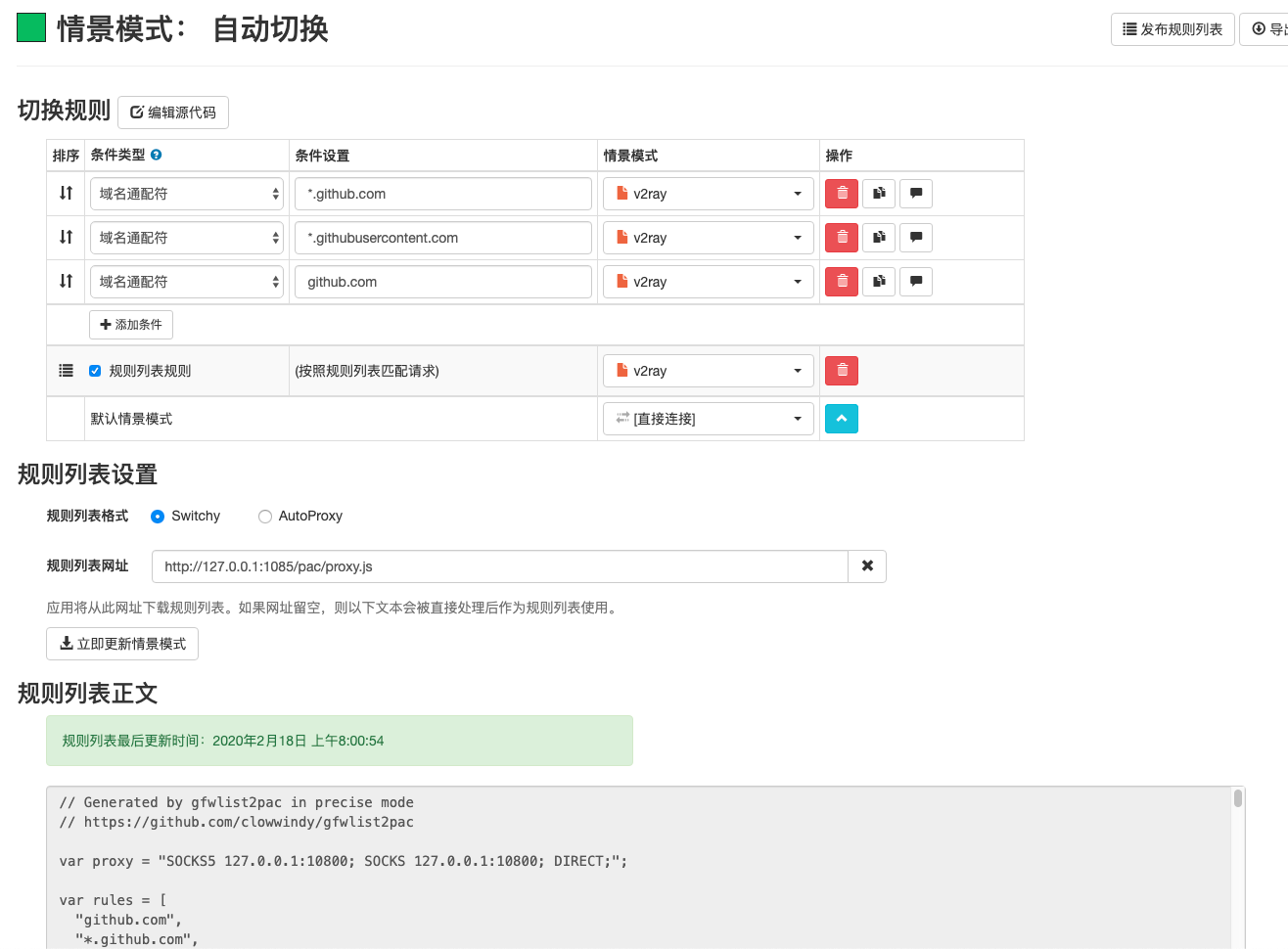
换用 V2RayX 的话就不用这么麻烦了,可以直接编辑pac,不过作者最近不怎么更新了。
无代理方案
修改 host
在 https://www.ipaddress.com/ 找到 github.com 等域名的美国的IP,然后绑定HOST就行。 这是一个体力活。
国内的不一定准,但可供参考
- https://tool.lu/dns/index.html
- http://tool.chinaz.com/dns/
window 系统文件位置在 C:/windows/system32/drivers/etc/hosts
mac 系统文件位于 /etc/hosts
建议用 SwitchHosts 管理 host 文件
进阶方案是写程序用调用web接口动态更新HOST
# raw.githubusercontent.com 是 GitHub 的静态文件托管域名
199.232.28.133 raw.githubusercontent.com
我当时是急着用raw.githubusercontent.com上面的代码,所以我改成一个美国的IP,然后通过代理访问上了。
Chrome浏览器插件
搜索安装 GitHub加速 即可,他们用一个中转的国内域名来 clone ,规避了 DNS解析的问题。
git 加速
参考自chuyik的解决方案
SSH协议使用 SSH 隧道进行代理(mac,Linux)
把自己的 ssh 加到海外的机器,xx.xx.xx.xx为机器的公网IP
然后把该机器的IP加到ssh配置 ~/.ssh/config 里面
1
2
Host github.com raw.githubusercontent.com
    ProxyCommand  ssh [email protected] nc %h %p
之后把自己客户端的公钥加到远程GitHub,克隆仓库时用ssh协议才会生效
1
git clone [email protected]:owner/git.git
http(s)协议时用本地代理 + git config
1
2
3
4
5
6
7
8
9
10
11
12
#  走 HTTP 代理
git config --global http.proxy "http://127.0.0.1:8080"
git config --global https.proxy "http://127.0.0.1:8080"
# 走 socks5 代理(如 Shadowsocks)
git config --global http.proxy "socks5://127.0.0.1:1080"
git config --global https.proxy "socks5://127.0.0.1:1080"
# 取消设置
git config --global --unset http.proxy
git config --global --unset https.proxy
# 最后检查下配置
git config --list --global
git config --list --system
1
 git clone https://github.com/owner/git.git
ssh over flclash
在你的 SSH 配置 (~/.ssh/config) 中写这样一段:
1
2
3
4
5
6
Host github.com
    HostName ssh.github.com
    Port 443
    User git
    # 如果你使用 socks5 代理
    ProxyCommand nc -x 127.0.0.1:7890 %h %p
这里 ssh.github.com 是 GitHub 支持 SSH-over-443 的地址。 
nc -x 主机:端口 %h %p 是使用 nc (netcat) 通过 SOCKS5 代理转发 SSH。 -x 指定代理类型 (socks),具体根据你 flclash 本地代理端口改。SSH Config 的 ProxyCommand 可以让 SSH 流量走代理。 
ServerAliveInterval 等参数也可以加,防止连接空闲被中断。
1
2
3
4
git config --global url."https://github.com/".insteadOf "[email protected]:"
ssh ssh.github.com
Please type 'yes', 'no' or the fingerprint: yes
Warning: Permanently added '[ssh.github.com]:443' (ED25519) to the list of known hosts.
为了躲过封锁 SSH 22 端口,GitHub 额外提供一个 443 端口的 SSH 服务,因此它的公钥指纹也不一样。 输入yes之后,git push就不会再出现断流了。
终极解决方案
美国绿卡

最后多说一句, 最近有人还原了ss协议客户端的整个攻击过程
参考链接
Recently due to the epidemic, when accessing GitHub, not only are user avatars not displaying, but executing code from raw.githubusercontent.com (GitHub static file hosting domain) directly explodes with 443. This makes everyone’s work quite inconvenient.
So I collected and organized the current solutions, trying to solve the problem from the source.
Understanding the Problem
GitHub-Related Domains
The IPs in HOST are wrong, please do not copy and paste directly!
# GitHub Start
192.30.253.112 github.com
192.30.253.119 gist.github.com
151.101.228.133 assets-cdn.github.com
151.101.228.133 raw.githubusercontent.com
151.101.228.133 gist.githubusercontent.com
151.101.228.133 cloud.githubusercontent.com
151.101.228.133 camo.githubusercontent.com
151.101.228.133 avatars0.githubusercontent.com
151.101.228.133 avatars1.githubusercontent.com
151.101.228.133 avatars2.githubusercontent.com
151.101.228.133 avatars3.githubusercontent.com
151.101.228.133 avatars4.githubusercontent.com
151.101.228.133 avatars5.githubusercontent.com
151.101.228.133 avatars6.githubusercontent.com
151.101.228.133 avatars7.githubusercontent.com
151.101.228.133 avatars8.githubusercontent.com
192.30.253.116  api.github.com
# GitHub End
Root Cause
Large-scale DNS hijacking pollution, the resolved Japanese IP 151.101.228.133 has severe packet loss.
1
2
3
4
5
ping 151.101.228.133
......
--- 151.101.228.133 ping statistics ---
2661 packets transmitted, 2309 packets received, 13.2% packet loss
round-trip min/avg/max/stddev = 69.550/117.602/230.267/21.696 ms
Proxy Solutions
Modify PAC File Yourself
Modify Local PAC
From the above, GitHub-related domains are:
1
2
3
github.com
*.github.com
*.githubusercontent.com
Windows-side Paper Airplane PAC is a local file;
mac-side Paper Airplane can be directly edited, one domain per line, the principle is similar, if you don’t understand just copy and paste ~
V2rayU is the same
Update Local DNS Resolution
1
2
3
4
5
# MAC (OS X 10.11+ )
sudo dscacheutil -flushcache
sudo killall -HUP mDNSResponder
# window
ipconfig /flushdns
SwitchyOmega Auto Switch Mode (Applicable to V2rayU)
Use “PAC scenario mode” to set up a v2 scenario mode.
Then set auto switch mode and use it.
If you switch to V2RayX , you don’t need to be so troublesome, you can directly edit the pac, but the author hasn’t updated much recently.
No-Proxy Solutions
Modify host
At https://www.ipaddress.com/ find the US IPs for github.com and other domains, then bind them to HOST. This is manual labor.
Domestic ones may not be accurate, but can be used as reference:
- https://tool.lu/dns/index.html
- http://tool.chinaz.com/dns/
Windows system file location is C:/windows/system32/drivers/etc/hosts
mac system file is located at /etc/hosts
It’s recommended to use SwitchHosts to manage host files
Advanced solution is to write a program to dynamically update HOST by calling web interfaces.
# raw.githubusercontent.com is GitHub's static file hosting domain
199.232.28.133 raw.githubusercontent.com
I was in a hurry to use code from raw.githubusercontent.com, so I changed it to a US IP, then accessed it through a proxy.
Chrome Browser Extension
Search and install GitHub Accelerator and you’re done. They use a relayed domestic domain to clone, avoiding the DNS resolution problem.
git Acceleration
Referenced from chuyik’s solution
SSH Protocol Using SSH Tunnel for Proxy (mac, Linux)
Add your ssh to an overseas machine, xx.xx.xx.xx is the machine’s public IP.
Then add the machine’s IP to ssh config ~/.ssh/config:
1
2
Host github.com raw.githubusercontent.com
    ProxyCommand  ssh [email protected] nc %h %p
After that, add your client’s public key to remote GitHub. It will only take effect when cloning repositories using ssh protocol.
1
git clone [email protected]:owner/git.git
http(s) Protocol Using Local Proxy + git config
1
2
3
4
5
6
7
8
9
10
11
12
# Use HTTP proxy
git config --global http.proxy "http://127.0.0.1:8080"
git config --global https.proxy "http://127.0.0.1:8080"
# Use socks5 proxy (like Shadowsocks)
git config --global http.proxy "socks5://127.0.0.1:1080"
git config --global https.proxy "socks5://127.0.0.1:1080"
# Cancel settings
git config --global --unset http.proxy
git config --global --unset https.proxy
# Finally check the configuration
git config --list --global
git config --list --system
1
 git clone https://github.com/owner/git.git
ssh over flclash
Write this in your SSH config (~/.ssh/config):
1
2
3
4
5
6
Host github.com
    HostName ssh.github.com
    Port 443
    User git
    # If you use socks5 proxy
    ProxyCommand nc -x 127.0.0.1:7890 %h %p
Here ssh.github.com is GitHub’s SSH-over-443 address. 
nc -x host:port %h %p uses nc (netcat) to forward SSH through SOCKS5 proxy. -x specifies proxy type (socks), change according to your flclash local proxy port. SSH Config’s ProxyCommand can make SSH traffic go through proxy. 
ServerAliveInterval and other parameters can also be added to prevent connection idle interruption.
1
2
3
4
git config --global url."https://github.com/".insteadOf "[email protected]:"
ssh ssh.github.com
Please type 'yes', 'no' or the fingerprint: yes
Warning: Permanently added '[ssh.github.com]:443' (ED25519) to the list of known hosts.
To avoid blocking SSH port 22, GitHub additionally provides an SSH service on port 443, so its public key fingerprint is also different. After entering yes, git push will no longer have disconnection issues.
Ultimate Solution
US Green Card
One last word, Recently someone restored the entire attack process of ss protocol client
Reference Links
最近、パンデミックの問題により、GitHubにアクセスする際、ユーザーのアバターが表示されないだけでなく、raw.githubusercontent.com(GitHubの静的ファイルホスティングドメイン)上のリモートコードを実行すると直接443が爆発します。皆の作業が非常に不便になっています。
そこで、現在の解決策を収集し、整理して、根本から問題を解決しようとしました。
問題の認識
GitHub関連ドメイン
HOST内のIPは間違っています。直接コピー&ペーストしないでください!
# GitHub Start
192.30.253.112 github.com
192.30.253.119 gist.github.com
151.101.228.133 assets-cdn.github.com
151.101.228.133 raw.githubusercontent.com
151.101.228.133 gist.githubusercontent.com
151.101.228.133 cloud.githubusercontent.com
151.101.228.133 camo.githubusercontent.com
151.101.228.133 avatars0.githubusercontent.com
151.101.228.133 avatars1.githubusercontent.com
151.101.228.133 avatars2.githubusercontent.com
151.101.228.133 avatars3.githubusercontent.com
151.101.228.133 avatars4.githubusercontent.com
151.101.228.133 avatars5.githubusercontent.com
151.101.228.133 avatars6.githubusercontent.com
151.101.228.133 avatars7.githubusercontent.com
151.101.228.133 avatars8.githubusercontent.com
192.30.253.116  api.github.com
# GitHub End
問題の根本原因
大規模なDNSハイジャック汚染、解決された日本のIP 151.101.228.133は深刻なパケット損失があります。
1
2
3
4
5
ping 151.101.228.133
......
--- 151.101.228.133 ping statistics ---
2661 packets transmitted, 2309 packets received, 13.2% packet loss
round-trip min/avg/max/stddev = 69.550/117.602/230.267/21.696 ms
プロキシソリューション
自分でPACファイルを変更
ローカルPACを変更
上記から、GitHub関連のドメインは:
1
2
3
github.com
*.github.com
*.githubusercontent.com
Windows側の紙飛行機PACはローカルファイルです。
mac側の紙飛行機は直接編集でき、1行に1つのドメイン、原理は似ています。理解できない場合はコピー&ペーストしてください〜
V2rayUも同様です
ローカルDNS解決を更新
1
2
3
4
5
# MAC(OS X 10.11+)
sudo dscacheutil -flushcache
sudo killall -HUP mDNSResponder
# window
ipconfig /flushdns
SwitchyOmega自動切り替えモード(V2rayUに適用)
「PACシナリオモード」を使用してv2のシナリオモードを設定します。
その後、自動切り替えモードを設定して使用します。
V2RayXに切り替える場合は、これほど面倒な必要はなく、pacを直接編集できますが、作者は最近あまり更新していません。
プロキシなしソリューション
hostを変更
https://www.ipaddress.com/ でgithub.comなどのドメインの米国のIPを見つけ、HOSTにバインドします。 これは手作業です。
国内のものは正確ではないかもしれませんが、参考にできます:
- https://tool.lu/dns/index.html
- http://tool.chinaz.com/dns/
Windowsシステムファイルの場所はC:/windows/system32/drivers/etc/hostsです
macシステムファイルは/etc/hostsにあります
SwitchHostsを使用してhostファイルを管理することをお勧めします
高度なソリューションは、Webインターフェースを呼び出してHOSTを動的に更新するプログラムを書くことです。
# raw.githubusercontent.comはGitHubの静的ファイルホスティングドメインです
199.232.28.133 raw.githubusercontent.com
私はraw.githubusercontent.com上のコードを急いで使用していたため、米国のIPに変更し、プロキシ経由でアクセスしました。
Chromeブラウザ拡張機能
GitHub加速を検索してインストールするだけで完了です。彼らは中継された国内ドメインを使用してクローンし、DNS解決の問題を回避しています。
git加速
chuyikのソリューションを参照
SSHプロトコルでSSHトンネルを使用してプロキシ(mac、Linux)
自分のsshを海外のマシンに追加し、xx.xx.xx.xxはマシンのパブリックIPです。
その後、マシンのIPをssh設定~/.ssh/configに追加します:
1
2
Host github.com raw.githubusercontent.com
    ProxyCommand  ssh [email protected] nc %h %p
その後、クライアントの公開鍵をリモートGitHubに追加します。SSHプロトコルを使用してリポジトリをクローンする場合にのみ有効になります。
1
git clone [email protected]:owner/git.git
http(s)プロトコルでローカルプロキシ+git configを使用
1
2
3
4
5
6
7
8
9
10
11
12
# HTTPプロキシを使用
git config --global http.proxy "http://127.0.0.1:8080"
git config --global https.proxy "http://127.0.0.1:8080"
# socks5プロキシを使用(Shadowsocksなど)
git config --global http.proxy "socks5://127.0.0.1:1080"
git config --global https.proxy "socks5://127.0.0.1:1080"
# 設定をキャンセル
git config --global --unset http.proxy
git config --global --unset https.proxy
# 最後に設定を確認
git config --list --global
git config --list --system
1
 git clone https://github.com/owner/git.git
flclash経由のssh
SSH設定(~/.ssh/config)に次のように記述します:
1
2
3
4
5
6
Host github.com
    HostName ssh.github.com
    Port 443
    User git
    # socks5プロキシを使用する場合
    ProxyCommand nc -x 127.0.0.1:7890 %h %p
ここでssh.github.comはGitHubのSSH-over-443アドレスです。 
nc -x ホスト:ポート %h %pはnc(netcat)を使用してSOCKS5プロキシ経由でSSHを転送します。-xはプロキシタイプ(socks)を指定します。flclashのローカルプロキシポートに応じて変更します。SSH ConfigのProxyCommandは、SSHトラフィックをプロキシ経由で送信できます。 
ServerAliveIntervalなどのパラメータも追加して、接続のアイドル中断を防ぐことができます。
1
2
3
4
git config --global url."https://github.com/".insteadOf "[email protected]:"
ssh ssh.github.com
Please type 'yes', 'no' or the fingerprint: yes
Warning: Permanently added '[ssh.github.com]:443' (ED25519) to the list of known hosts.
SSHポート22のブロックを回避するため、GitHubは追加で443ポートのSSHサービスを提供しているため、その公開鍵フィンガープリントも異なります。 yesを入力すると、git pushで切断の問題が発生しなくなります。
究極のソリューション
米国グリーンカード
最後にもう一言、 最近、ssプロトコルクライアントの攻撃プロセス全体を復元した人がいます
参考リンク
Недавно из-за проблемы с эпидемией при доступе к GitHub не только аватары пользователей не отображаются, но и выполнение кода с raw.githubusercontent.com (домен хостинга статических файлов GitHub) напрямую взрывается с 443. Это делает работу всех довольно неудобной.
Поэтому я собрал и организовал текущие решения, пытаясь решить проблему из источника.
Понимание проблемы
Домены, связанные с GitHub
IP-адреса в HOST неверны, пожалуйста, не копируйте и не вставляйте напрямую!
# GitHub Start
192.30.253.112 github.com
192.30.253.119 gist.github.com
151.101.228.133 assets-cdn.github.com
151.101.228.133 raw.githubusercontent.com
151.101.228.133 gist.githubusercontent.com
151.101.228.133 cloud.githubusercontent.com
151.101.228.133 camo.githubusercontent.com
151.101.228.133 avatars0.githubusercontent.com
151.101.228.133 avatars1.githubusercontent.com
151.101.228.133 avatars2.githubusercontent.com
151.101.228.133 avatars3.githubusercontent.com
151.101.228.133 avatars4.githubusercontent.com
151.101.228.133 avatars5.githubusercontent.com
151.101.228.133 avatars6.githubusercontent.com
151.101.228.133 avatars7.githubusercontent.com
151.101.228.133 avatars8.githubusercontent.com
192.30.253.116  api.github.com
# GitHub End
Корневая причина
Крупномасштабное загрязнение DNS-хайджекинга, разрешенный японский IP 151.101.228.133 имеет серьезную потерю пакетов.
1
2
3
4
5
ping 151.101.228.133
......
--- 151.101.228.133 ping statistics ---
2661 packets transmitted, 2309 packets received, 13.2% packet loss
round-trip min/avg/max/stddev = 69.550/117.602/230.267/21.696 ms
Решения с прокси
Самостоятельно изменить файл PAC
Изменить локальный PAC
Из вышеизложенного, домены, связанные с GitHub:
1
2
3
github.com
*.github.com
*.githubusercontent.com
PAC Paper Airplane на стороне Windows — это локальный файл;
Paper Airplane на стороне mac можно редактировать напрямую, один домен на строку, принцип аналогичен, если не понимаете, просто скопируйте и вставьте ~
V2rayU аналогично
Обновить локальное разрешение DNS
1
2
3
4
5
# MAC (OS X 10.11+ )
sudo dscacheutil -flushcache
sudo killall -HUP mDNSResponder
# window
ipconfig /flushdns
Режим автоматического переключения SwitchyOmega (применимо к V2rayU)
Используйте “режим сценария PAC” для настройки режима сценария v2.
Затем установите режим автоматического переключения и используйте его.
Если переключиться на V2RayX , не нужно так много хлопот, можно напрямую редактировать pac, но автор не обновлял много недавно.
Решения без прокси
Изменить host
На https://www.ipaddress.com/ найдите IP-адреса США для github.com и других доменов, затем привяжите их к HOST. Это ручная работа.
Внутренние могут быть неточными, но могут служить справочной информацией:
- https://tool.lu/dns/index.html
- http://tool.chinaz.com/dns/
Расположение файла системы Windows: C:/windows/system32/drivers/etc/hosts
Файл системы mac находится в /etc/hosts
Рекомендуется использовать SwitchHosts для управления файлами host
Продвинутое решение — написать программу для динамического обновления HOST путем вызова веб-интерфейсов.
# raw.githubusercontent.com — это домен хостинга статических файлов GitHub
199.232.28.133 raw.githubusercontent.com
Я спешил использовать код с raw.githubusercontent.com, поэтому изменил его на IP США, затем получил доступ через прокси.
Расширение браузера Chrome
Найдите и установите GitHub Accelerator, и все готово. Они используют транзитный внутренний домен для клонирования, избегая проблемы разрешения DNS.
Ускорение git
Ссылается на решение chuyik
Протокол SSH с использованием SSH-туннеля для прокси (mac, Linux)
Добавьте свой ssh на зарубежную машину, xx.xx.xx.xx — это публичный IP машины.
Затем добавьте IP машины в конфигурацию ssh ~/.ssh/config:
1
2
Host github.com raw.githubusercontent.com
    ProxyCommand  ssh [email protected] nc %h %p
После этого добавьте публичный ключ вашего клиента на удаленный GitHub. Это вступит в силу только при клонировании репозиториев с использованием протокола ssh.
1
git clone [email protected]:owner/git.git
Протокол http(s) с использованием локального прокси + git config
1
2
3
4
5
6
7
8
9
10
11
12
# Использовать HTTP-прокси
git config --global http.proxy "http://127.0.0.1:8080"
git config --global https.proxy "http://127.0.0.1:8080"
# Использовать socks5-прокси (например, Shadowsocks)
git config --global http.proxy "socks5://127.0.0.1:1080"
git config --global https.proxy "socks5://127.0.0.1:1080"
# Отменить настройки
git config --global --unset http.proxy
git config --global --unset https.proxy
# Наконец проверьте конфигурацию
git config --list --global
git config --list --system
1
 git clone https://github.com/owner/git.git
ssh через flclash
Напишите это в вашей конфигурации SSH (~/.ssh/config):
1
2
3
4
5
6
Host github.com
    HostName ssh.github.com
    Port 443
    User git
    # Если вы используете socks5-прокси
    ProxyCommand nc -x 127.0.0.1:7890 %h %p
Здесь ssh.github.com — это адрес GitHub для SSH-over-443. 
nc -x хост:порт %h %p использует nc (netcat) для пересылки SSH через SOCKS5-прокси. -x указывает тип прокси (socks), измените в соответствии с вашим локальным портом прокси flclash. ProxyCommand SSH Config может заставить SSH-трафик проходить через прокси. 
ServerAliveInterval и другие параметры также можно добавить, чтобы предотвратить прерывание простоя соединения.
1
2
3
4
git config --global url."https://github.com/".insteadOf "[email protected]:"
ssh ssh.github.com
Please type 'yes', 'no' or the fingerprint: yes
Warning: Permanently added '[ssh.github.com]:443' (ED25519) to the list of known hosts.
Чтобы избежать блокировки SSH-порта 22, GitHub дополнительно предоставляет SSH-службу на порту 443, поэтому отпечаток его публичного ключа также отличается. После ввода yes git push больше не будет иметь проблем с разрывом соединения.
Окончательное решение
Грин-карта США
Последнее слово, Недавно кто-то восстановил весь процесс атаки клиента протокола ss
Ссылки
💬 讨论 / Discussion
对这篇文章有想法?欢迎在 GitHub 上发起讨论。
Have thoughts on this post? Start a discussion on GitHub.