连接api-server一般分3种情况:
- Kubernetes Node通过kubectl proxy中转连接
- 通过授权验证,直接连接(kubectl和各种client就是这种情况)
kubectl加载~/.kube/config作为授权信息,请求远端的api-server的resetful API.api-server根据你提交的授权信息判断有没有权限,有权限的话就将对应的结果返回给你。
- 容器内部通过
ServiceAccount连接
容器请求api-server
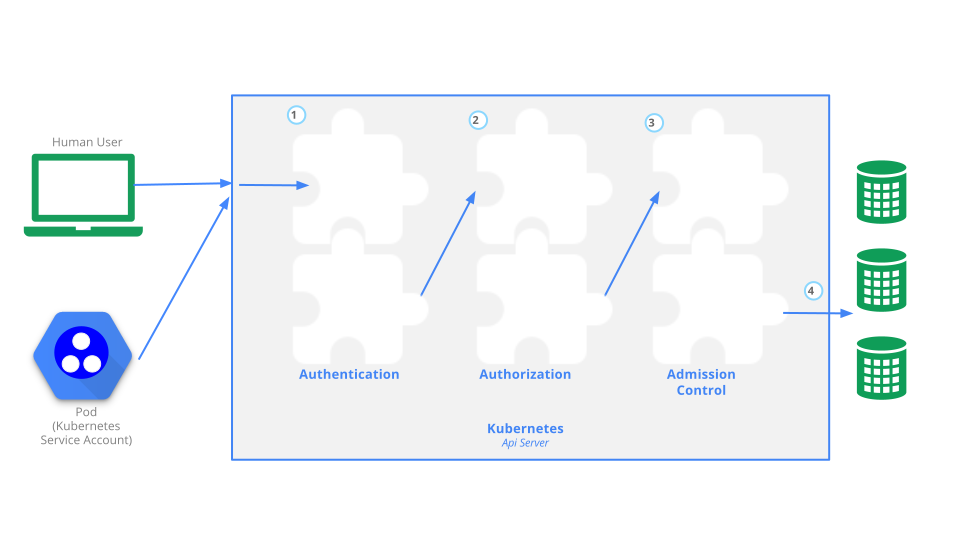
Kubernetes这套RBAC的机制在之前的文章有提过。这里就不解释了
为了方便起见,我直接使用kube-system的admin作为例子。
1
2
3
4
5
6
7
8
9
10
11
12
13
14
15
16
17
18
19
20
21
22
23
24
25
26
27
28
29
30
31
32
33
34
35
36
37
38
39
40
41
42
43
44
45
46
47
48
49
50
51
52
53
54
#

apiVersion: v1
kind: ServiceAccount
metadata:
  annotations:
    kubectl.kubernetes.io/last-applied-configuration: |
      {"apiVersion":"v1","kind":"ServiceAccount","metadata":{"annotations":{},"name":"admin","namespace":"kube-system"}}
  name: admin
  namespace: kube-system
  resourceVersion: "383"
secrets:
- name: admin-token-wggwk
---
apiVersion: rbac.authorization.k8s.io/v1
kind: ClusterRole
metadata:
  annotations:
    rbac.authorization.kubernetes.io/autoupdate: "true"
  labels:
    kubernetes.io/bootstrapping: rbac-defaults
  name: cluster-admin
  resourceVersion: "51"
rules:
- apiGroups:
  - '*'
  resources:
  - '*'
  verbs:
  - '*'
- nonResourceURLs:
  - '*'
  verbs:
  - '*'
---
apiVersion: rbac.authorization.k8s.io/v1
kind: ClusterRoleBinding
metadata:
  annotations:
    rbac.authorization.kubernetes.io/autoupdate: "true"
  labels:
    kubernetes.io/bootstrapping: rbac-defaults
  name: cluster-admin
  resourceVersion: "102"
roleRef:
  apiGroup: rbac.authorization.k8s.io
  kind: ClusterRole
  name: cluster-admin
subjects:
- apiGroup: rbac.authorization.k8s.io
  kind: Group
  name: system:masters

#
简单地说,容器通过ServiceAccount配合RBAC这套机制,让容器拥有访问api-server的权限。
原本我打算在kube-system下面创建一个nginx容器,去访问,但是curl失败了,后来我找了个centos的镜像去测试。大家记得配置好serviceAccount就行
1
metadata.spec.template.spec.serviceAccount: admin
deploy声明sa(ServiceAccount)的本质
在deploy声明sa的本质是把sa的对应的secret挂载到/var/run/secrets/kubernetes.io/serviceaccount目录中。
不声明sa,则把default作为sa挂载进去
1
2
3
4
5
6
7
8
9
10
11
12
13
14
15
16
17
# k edit secret admin-token-wggwk
# 用edit加载的secret内容都会以base64形式表示
# base64(kube-system):a3ViZS1zeXN0ZW0=
apiVersion: v1
data:
  ca.crt: *******
  namespace: a3ViZS1zeXN0ZW0=
  token: *******
kind: Secret
metadata:
  annotations:
    kubernetes.io/service-account.name: admin
    kubernetes.io/service-account.uid: 9911ff2a-8c46-4179-80ac-727f48012229
  name: admin-token-wggwk
  namespace: kube-system
  resourceVersion: "378"
type: kubernetes.io/service-account-token
所以deploy衍生的每一个pod里面的容器,
/var/run/secrets/kubernetes.io/serviceaccount目录下面都会有这3个文件
1
2
3
4
5
/run/secrets/kubernetes.io/serviceaccount # ls -l
total 0
lrwxrwxrwx    1 root     root            13 Apr 19 06:46 ca.crt -> ..data/ca.crt
lrwxrwxrwx    1 root     root            16 Apr 19 06:46 namespace -> ..data/namespace
lrwxrwxrwx    1 root     root            12 Apr 19 06:46 token -> ..data/token
虽然这3个文件都是软链接而且最终指向了下面那个带日期的文件夹,但是我们不用管它。
1
2
3
4
5
6
7
8
9
/run/secrets/kubernetes.io/serviceaccount # ls -a -l
total 4
drwxrwxrwt    3 root     root           140 Apr 19 06:46 .
drwxr-xr-x    3 root     root          4096 Apr 19 06:46 ..
drwxr-xr-x    2 root     root           100 Apr 19 06:46 ..2019_04_19_06_46_10.877180351
lrwxrwxrwx    1 root     root            31 Apr 19 06:46 ..data -> ..2019_04_19_06_46_10.877180351
lrwxrwxrwx    1 root     root            13 Apr 19 06:46 ca.crt -> ..data/ca.crt
lrwxrwxrwx    1 root     root            16 Apr 19 06:46 namespace -> ..data/namespace
lrwxrwxrwx    1 root     root            12 Apr 19 06:46 token -> ..data/token
curl请求api-server
集群就绪之后,在default这个命名空间下会有kubernetes这个svc,容器透过ca.crt作为证书去请求即可。跨ns的访问方式为https://kubernetes.default.svc:443
前期准备
1
2
3
4
5
kubectl exec -it $po sh -n kube-system
cd /var/run/secrets/kubernetes.io/serviceaccount
TOKEN=$(cat token)
APISERVER=https://kubernetes.default.svc:443
先伪装成一个流氓去访问api-server
1
2
3
4
5
6
7
8
9
10
11
12
13
14
15
16
sh-4.2# curl -voa  -s  $APISERVER/version
* About to connect() to kubernetes.default.svc port 443 (#0)
*   Trying 172.30.0.1...
* Connected to kubernetes.default.svc (172.30.0.1) port 443 (#0)
* Initializing NSS with certpath: sql:/etc/pki/nssdb
*   CAfile: /etc/pki/tls/certs/ca-bundle.crt
  CApath: none
* Server certificate:
* 	subject: CN=kube-apiserver
* 	start date: Jul 24 06:31:00 2018 GMT
* 	expire date: Jul 24 06:44:02 2019 GMT
* 	common name: kube-apiserver
* 	issuer: CN=cc95defe1ffd6401d8ede6d4efb0f0f7c,OU=default,O=cc95defe1ffd6401d8ede6d4efb0f0f7c
* NSS error -8179 (SEC_ERROR_UNKNOWN_ISSUER)
* Peer's Certificate issuer is not recognized.
* Closing connection 0
可以看到,用默认的/etc/pki/tls/certs/ca-bundle.crt公钥去访问,直接就报证书对不上了(Peer’s Certificate issuer is not recognized.)
带证书去访问api-server
1
2
3
4
5
6
7
8
9
10
11
12
13
14
curl -s $APISERVER/version  \
--header "Authorization: Bearer $TOKEN" \
--cacert ca.crt
{
  "major": "1",
  "minor": "11",
  "gitVersion": "v1.11.5",
  "gitCommit": "753b2dbc622f5cc417845f0ff8a77f539a4213ea",
  "gitTreeState": "clean",
  "buildDate": "2018-11-26T14:31:35Z",
  "goVersion": "go1.10.3",
  "compiler": "gc",
  "platform": "linux/amd64"
}
那这样思路就很明确了,curl的时候带上正确的证书(ca.crt)和请求头就行了。
使用curl访问常见API
这里先要介绍一个概念selfLink.在kubernetes里面,所有事物皆资源/对象。selfLink就是每一个资源对应的api-server地址。selfLink跟资源是一一对应的。
selfLink是有规律的,由namespace,type,apiVersion,name等组成。
get node
1
kubectl get no
1
2
3
4
curl \
-s $APISERVER/api/v1/nodes?watch \
--header "Authorization: Bearer $TOKEN" \
--cacert  ca.crt
get pod
1
kubectl get po -n kube-system -w
1
2
3
4
curl \
-s $APISERVER/api/v1/namespaces/kube-system/pods?watch \
--header "Authorization: Bearer $TOKEN" \
--cacert  ca.crt
get pod log
1
kubectl logs  -f -c logtail  -n kube-system  logtail-ds-vvpfr
1
2
3
4
curl \
-s $APISERVER"/api/v1/namespaces/kube-system/pods/logtail-ds-vvpfr/log?container=logtail&follow" \
--header "Authorization: Bearer $TOKEN" \
--cacert  ca.crt
完整API见kubernetes API
使用JavaScript客户端访问 api-server
2019-08-23,我在部署 kubeflow 的时候,发现里面有个组件是用 nodejs 去请求 api service 的,观察了一下代码,加载配置的地方大致如此。
1
2
3
4
5
6
7
8
9
10
11
12
13
14
15
16
17
18
19
20
21
22
23
24
25
26
27
28
29
30
31
32
33
34
35
36
37
38
39
40
41
42
43
44
45
46
47
48
49
50
51
52
53
54
55
56
57
58
59
60
61
62
63
64
65
66
67
68
69
70
71
72
73
74
75
76
77
78
79
80
81
82
83
84
85
86

public loadFromDefault() {
        if (process.env.KUBECONFIG && process.env.KUBECONFIG.length > 0) {
            const files = process.env.KUBECONFIG.split(path.delimiter);
            this.loadFromFile(files[0]);
            for (let i = 1; i < files.length; i++) {
                const kc = new KubeConfig();
                kc.loadFromFile(files[i]);
                this.mergeConfig(kc);
            }
            return;
        }
        const home = findHomeDir();
        if (home) {
            const config = path.join(home, '.kube', 'config');
            if (fileExists(config)) {
                this.loadFromFile(config);
                return;
            }
        }
        if (process.platform === 'win32' && shelljs.which('wsl.exe')) {
            // TODO: Handle if someome set $KUBECONFIG in wsl here...
            try {
                const result = execa.sync('wsl.exe', ['cat', shelljs.homedir() + '/.kube/config']);
                if (result.code === 0) {
                    this.loadFromString(result.stdout);
                    return;
                }
            } catch (err) {
                // Falling back to alternative auth
            }
        }

        if (fileExists(Config.SERVICEACCOUNT_TOKEN_PATH)) {
            this.loadFromCluster();
            return;
        }

        this.loadFromClusterAndUser(
            { name: 'cluster', server: 'http://localhost:8080' } as Cluster,
            { name: 'user' } as User,
        );
    }
......


    public loadFromCluster(pathPrefix: string = '') {
        const host = process.env.KUBERNETES_SERVICE_HOST;
        const port = process.env.KUBERNETES_SERVICE_PORT;
        const clusterName = 'inCluster';
        const userName = 'inClusterUser';
        const contextName = 'inClusterContext';

        let scheme = 'https';
        if (port === '80' || port === '8080' || port === '8001') {
            scheme = 'http';
        }

        this.clusters = [
            {
                name: clusterName,
                caFile: `${pathPrefix}${Config.SERVICEACCOUNT_CA_PATH}`,
                server: `${scheme}://${host}:${port}`,
                skipTLSVerify: false,
            },
        ];
        this.users = [
            {
                name: userName,
                authProvider: {
                    name: 'tokenFile',
                    config: {
                        tokenFile: `${pathPrefix}${Config.SERVICEACCOUNT_TOKEN_PATH}`,
                    },
                },
            },
        ];
        this.contexts = [
            {
                cluster: clusterName,
                name: contextName,
                user: userName,
            },
        ];
        this.currentContext = contextName;
    }
可以看到,加载配置是有先后顺序的。 sa 排在比较靠后的优先级。
host 和 port 通过读取相应 env 得出(实际上,就算在yaml没有配置ENV, kubernetes 本身也会注入大量ENV,这些ENV大多是svc的ip地址和端口等)
而且默认的客户端 skipTLSVerify: false,
那么使用默认的客户端,要取消SSL验证咋办呢?这里提供一个比较蠢但是万无一失的办法:
1
2
3
4
5
6
7
8
9
10
11
12
13
14
15
16
17
18
19
20
import * as k8s from '@kubernetes/client-node';
import { Cluster } from '@kubernetes/client-node/dist/config_types';

    this.kubeConfig.loadFromDefault();
    const context =
      this.kubeConfig.getContextObject(this.kubeConfig.getCurrentContext());
    if (context && context.namespace) {
      this.namespace = context.namespace;
    }
    let oldCluster = this.kubeConfig.getCurrentCluster()
    let cluster: Cluster = {
      name: oldCluster.name,
      caFile: oldCluster.caFile,
      server: oldCluster.server,
      skipTLSVerify: true,
    }
    kubeConfig.clusters = [cluster]
    this.coreAPI = this.kubeConfig.makeApiClient(k8s.Core_v1Api);
    this.customObjectsAPI =
      this.kubeConfig.makeApiClient(k8s.Custom_objectsApi);
参考链接
Connecting to api-server generally falls into 3 cases:
- Kubernetes Node connects through kubectl proxy relay
- Connect directly through authorization verification (kubectl and various clients fall into this case)
kubectlloads~/.kube/configas authorization information, requests the remoteapi-server’s RESTful API.api-serverjudges whether you have permission based on the authorization information you submit. If you have permission, it returns the corresponding result to you.
- Containers connect through
ServiceAccount
Container Requesting api-server
The RBAC mechanism of Kubernetes was mentioned in a previous article. I won’t explain it here.
For convenience, I’ll directly use admin from kube-system as an example.
1
2
3
4
5
6
7
8
9
10
11
12
13
14
15
16
17
18
19
20
21
22
23
24
25
26
27
28
29
30
31
32
33
34
35
36
37
38
39
40
41
42
43
44
45
46
47
48
49
50
51
52
53
54
#

apiVersion: v1
kind: ServiceAccount
metadata:
  annotations:
    kubectl.kubernetes.io/last-applied-configuration: |
      {"apiVersion":"v1","kind":"ServiceAccount","metadata":{"annotations":{},"name":"admin","namespace":"kube-system"}}
  name: admin
  namespace: kube-system
  resourceVersion: "383"
secrets:
- name: admin-token-wggwk
---
apiVersion: rbac.authorization.k8s.io/v1
kind: ClusterRole
metadata:
  annotations:
    rbac.authorization.kubernetes.io/autoupdate: "true"
  labels:
    kubernetes.io/bootstrapping: rbac-defaults
  name: cluster-admin
  resourceVersion: "51"
rules:
- apiGroups:
  - '*'
  resources:
  - '*'
  verbs:
  - '*'
- nonResourceURLs:
  - '*'
  verbs:
  - '*'
---
apiVersion: rbac.authorization.k8s.io/v1
kind: ClusterRoleBinding
metadata:
  annotations:
    rbac.authorization.kubernetes.io/autoupdate: "true"
  labels:
    kubernetes.io/bootstrapping: rbac-defaults
  name: cluster-admin
  resourceVersion: "102"
roleRef:
  apiGroup: rbac.authorization.k8s.io
  kind: ClusterRole
  name: cluster-admin
subjects:
- apiGroup: rbac.authorization.k8s.io
  kind: Group
  name: system:masters

#
Simply put, containers have access to api-server through ServiceAccount combined with the RBAC mechanism.
Originally I planned to create an nginx container under kube-system to access, but curl failed. Later I found a centos image to test. Everyone just remember to configure serviceAccount properly.
1
metadata.spec.template.spec.serviceAccount: admin
The Essence of deploy Declaring sa (ServiceAccount)
The essence of declaring sa in deploy is mounting the corresponding secret of sa to the /var/run/secrets/kubernetes.io/serviceaccount directory.
If sa is not declared, default is mounted as sa.
1
2
3
4
5
6
7
8
9
10
11
12
13
14
15
16
17
# k edit secret admin-token-wggwk
# Secrets loaded with edit will all be represented in base64 form
# base64(kube-system):a3ViZS1zeXN0ZW0=
apiVersion: v1
data:
  ca.crt: *******
  namespace: a3ViZS1zeXN0ZW0=
  token: *******
kind: Secret
metadata:
  annotations:
    kubernetes.io/service-account.name: admin
    kubernetes.io/service-account.uid: 9911ff2a-8c46-4179-80ac-727f48012229
  name: admin-token-wggwk
  namespace: kube-system
  resourceVersion: "378"
type: kubernetes.io/service-account-token
So in every container in pods derived from deploy,
the /var/run/secrets/kubernetes.io/serviceaccount directory will have these 3 files:
1
2
3
4
5
/run/secrets/kubernetes.io/serviceaccount # ls -l
total 0
lrwxrwxrwx    1 root     root            13 Apr 19 06:46 ca.crt -> ..data/ca.crt
lrwxrwxrwx    1 root     root            16 Apr 19 06:46 namespace -> ..data/namespace
lrwxrwxrwx    1 root     root            12 Apr 19 06:46 token -> ..data/token
Although these 3 files are all soft links and ultimately point to the dated folder below, we don’t need to worry about it.
1
2
3
4
5
6
7
8
9
/run/secrets/kubernetes.io/serviceaccount # ls -a -l
total 4
drwxrwxrwt    3 root     root           140 Apr 19 06:46 .
drwxr-xr-x    3 root     root          4096 Apr 19 06:46 ..
drwxr-xr-x    2 root     root           100 Apr 19 06:46 ..2019_04_19_06_46_10.877180351
lrwxrwxrwx    1 root     root            31 Apr 19 06:46 ..data -> ..2019_04_19_06_46_10.877180351
lrwxrwxrwx    1 root     root            13 Apr 19 06:46 ca.crt -> ..data/ca.crt
lrwxrwxrwx    1 root     root            16 Apr 19 06:46 namespace -> ..data/namespace
lrwxrwxrwx    1 root     root            12 Apr 19 06:46 token -> ..data/token
curl Requesting api-server
After the cluster is ready, there will be a kubernetes svc in the default namespace. Containers can request using ca.crt as the certificate. Cross-ns access method is https://kubernetes.default.svc:443
Prerequisites
1
2
3
4
5
kubectl exec -it $po sh -n kube-system
cd /var/run/secrets/kubernetes.io/serviceaccount
TOKEN=$(cat token)
APISERVER=https://kubernetes.default.svc:443
First Pretend to be a Rogue to Access api-server
1
2
3
4
5
6
7
8
9
10
11
12
13
14
15
16
sh-4.2# curl -voa  -s  $APISERVER/version
* About to connect() to kubernetes.default.svc port 443 (#0)
*   Trying 172.30.0.1...
* Connected to kubernetes.default.svc (172.30.0.1) port 443 (#0)
* Initializing NSS with certpath: sql:/etc/pki/nssdb
*   CAfile: /etc/pki/tls/certs/ca-bundle.crt
  CApath: none
* Server certificate:
* 	subject: CN=kube-apiserver
* 	start date: Jul 24 06:31:00 2018 GMT
* 	expire date: Jul 24 06:44:02 2019 GMT
* 	common name: kube-apiserver
* 	issuer: CN=cc95defe1ffd6401d8ede6d4efb0f0f7c,OU=default,O=cc95defe1ffd6401d8ede6d4efb0f0f7c
* NSS error -8179 (SEC_ERROR_UNKNOWN_ISSUER)
* Peer's Certificate issuer is not recognized.
* Closing connection 0
As you can see, using the default /etc/pki/tls/certs/ca-bundle.crt public key to access directly reports that the certificate doesn’t match (Peer’s Certificate issuer is not recognized.).
Access api-server with Certificate
1
2
3
4
5
6
7
8
9
10
11
12
13
14
curl -s $APISERVER/version  \
--header "Authorization: Bearer $TOKEN" \
--cacert ca.crt
{
  "major": "1",
  "minor": "11",
  "gitVersion": "v1.11.5",
  "gitCommit": "753b2dbc622f5cc417845f0ff8a77f539a4213ea",
  "gitTreeState": "clean",
  "buildDate": "2018-11-26T14:31:35Z",
  "goVersion": "go1.10.3",
  "compiler": "gc",
  "platform": "linux/amd64"
}
So the approach is clear: when curling, bring the correct certificate (ca.crt) and request header.
Using curl to Access Common APIs
Here I need to introduce a concept selfLink. In kubernetes, everything is a resource/object. selfLink is the api-server address corresponding to each resource. selfLink has a one-to-one correspondence with resources.
selfLink has a pattern, composed of namespace, type, apiVersion, name, etc.
get node
1
kubectl get no
1
2
3
4
curl \
-s $APISERVER/api/v1/nodes?watch \
--header "Authorization: Bearer $TOKEN" \
--cacert  ca.crt
get pod
1
kubectl get po -n kube-system -w
1
2
3
4
curl \
-s $APISERVER/api/v1/namespaces/kube-system/pods?watch \
--header "Authorization: Bearer $TOKEN" \
--cacert  ca.crt
get pod log
1
kubectl logs  -f -c logtail  -n kube-system  logtail-ds-vvpfr
1
2
3
4
curl \
-s $APISERVER"/api/v1/namespaces/kube-system/pods/logtail-ds-vvpfr/log?container=logtail&follow" \
--header "Authorization: Bearer $TOKEN" \
--cacert  ca.crt
Complete API see kubernetes API
Using JavaScript Client to Access api-server
2019-08-23, when I was deploying kubeflow, I found that there’s a component inside that uses nodejs to request api service. I observed the code, and the place where configuration is loaded is roughly like this.
1
2
3
4
5
6
7
8
9
10
11
12
13
14
15
16
17
18
19
20
21
22
23
24
25
26
27
28
29
30
31
32
33
34
35
36
37
38
39
40
41
42
43
44
45
46
47
48
49
50
51
52
53
54
55
56
57
58
59
60
61
62
63
64
65
66
67
68
69
70
71
72
73
74
75
76
77
78
79
80
81
82
83
84
85
86

public loadFromDefault() {
        if (process.env.KUBECONFIG && process.env.KUBECONFIG.length > 0) {
            const files = process.env.KUBECONFIG.split(path.delimiter);
            this.loadFromFile(files[0]);
            for (let i = 1; i < files.length; i++) {
                const kc = new KubeConfig();
                kc.loadFromFile(files[i]);
                this.mergeConfig(kc);
            }
            return;
        }
        const home = findHomeDir();
        if (home) {
            const config = path.join(home, '.kube', 'config');
            if (fileExists(config)) {
                this.loadFromFile(config);
                return;
            }
        }
        if (process.platform === 'win32' && shelljs.which('wsl.exe')) {
            // TODO: Handle if someome set $KUBECONFIG in wsl here...
            try {
                const result = execa.sync('wsl.exe', ['cat', shelljs.homedir() + '/.kube/config']);
                if (result.code === 0) {
                    this.loadFromString(result.stdout);
                    return;
                }
            } catch (err) {
                // Falling back to alternative auth
            }
        }

        if (fileExists(Config.SERVICEACCOUNT_TOKEN_PATH)) {
            this.loadFromCluster();
            return;
        }

        this.loadFromClusterAndUser(
            { name: 'cluster', server: 'http://localhost:8080' } as Cluster,
            { name: 'user' } as User,
        );
    }
......


    public loadFromCluster(pathPrefix: string = '') {
        const host = process.env.KUBERNETES_SERVICE_HOST;
        const port = process.env.KUBERNETES_SERVICE_PORT;
        const clusterName = 'inCluster';
        const userName = 'inClusterUser';
        const contextName = 'inClusterContext';

        let scheme = 'https';
        if (port === '80' || port === '8080' || port === '8001') {
            scheme = 'http';
        }

        this.clusters = [
            {
                name: clusterName,
                caFile: `${pathPrefix}${Config.SERVICEACCOUNT_CA_PATH}`,
                server: `${scheme}://${host}:${port}`,
                skipTLSVerify: false,
            },
        ];
        this.users = [
            {
                name: userName,
                authProvider: {
                    name: 'tokenFile',
                    config: {
                        tokenFile: `${pathPrefix}${Config.SERVICEACCOUNT_TOKEN_PATH}`,
                    },
                },
            },
        ];
        this.contexts = [
            {
                cluster: clusterName,
                name: contextName,
                user: userName,
            },
        ];
        this.currentContext = contextName;
    }
As you can see, loading configuration has a priority order. sa is ranked relatively low in priority.
host and port are obtained by reading the corresponding env (actually, even if ENV is not configured in yaml, kubernetes itself will inject a large number of ENVs, these ENVs are mostly svc IP addresses and ports, etc.)
And the default client skipTLSVerify: false,
So how to cancel SSL verification when using the default client? Here’s a stupid but foolproof method:
1
2
3
4
5
6
7
8
9
10
11
12
13
14
15
16
17
18
19
20
import * as k8s from '@kubernetes/client-node';
import { Cluster } from '@kubernetes/client-node/dist/config_types';

    this.kubeConfig.loadFromDefault();
    const context =
      this.kubeConfig.getContextObject(this.kubeConfig.getCurrentContext());
    if (context && context.namespace) {
      this.namespace = context.namespace;
    }
    let oldCluster = this.kubeConfig.getCurrentCluster()
    let cluster: Cluster = {
      name: oldCluster.name,
      caFile: oldCluster.caFile,
      server: oldCluster.server,
      skipTLSVerify: true,
    }
    kubeConfig.clusters = [cluster]
    this.coreAPI = this.kubeConfig.makeApiClient(k8s.Core_v1Api);
    this.customObjectsAPI =
      this.kubeConfig.makeApiClient(k8s.Custom_objectsApi);
Reference Links
api-serverへの接続は、一般的に3つのケースに分かれます:
- Kubernetes Nodeがkubectl proxyを介して中継接続
- 認証検証を介して直接接続(kubectlとさまざまなクライアントがこのケース)
kubectlは~/.kube/configを認証情報として読み込み、リモートのapi-serverのRESTful APIをリクエストします。api-serverは、送信された認証情報に基づいて権限があるかどうかを判断し、権限がある場合は対応する結果を返します。
- コンテナが
ServiceAccountを介して接続
コンテナがapi-serverをリクエスト
KubernetesのこのRBACメカニズムは以前の記事で言及されました。ここでは説明しません。
便宜上、kube-systemのadminを直接例として使用します。
1
2
3
4
5
6
7
8
9
10
11
12
13
14
15
16
17
18
19
20
21
22
23
24
25
26
27
28
29
30
31
32
33
34
35
36
37
38
39
40
41
42
43
44
45
46
47
48
49
50
51
52
53
54
#

apiVersion: v1
kind: ServiceAccount
metadata:
  annotations:
    kubectl.kubernetes.io/last-applied-configuration: |
      {"apiVersion":"v1","kind":"ServiceAccount","metadata":{"annotations":{},"name":"admin","namespace":"kube-system"}}
  name: admin
  namespace: kube-system
  resourceVersion: "383"
secrets:
- name: admin-token-wggwk
---
apiVersion: rbac.authorization.k8s.io/v1
kind: ClusterRole
metadata:
  annotations:
    rbac.authorization.kubernetes.io/autoupdate: "true"
  labels:
    kubernetes.io/bootstrapping: rbac-defaults
  name: cluster-admin
  resourceVersion: "51"
rules:
- apiGroups:
  - '*'
  resources:
  - '*'
  verbs:
  - '*'
- nonResourceURLs:
  - '*'
  verbs:
  - '*'
---
apiVersion: rbac.authorization.k8s.io/v1
kind: ClusterRoleBinding
metadata:
  annotations:
    rbac.authorization.kubernetes.io/autoupdate: "true"
  labels:
    kubernetes.io/bootstrapping: rbac-defaults
  name: cluster-admin
  resourceVersion: "102"
roleRef:
  apiGroup: rbac.authorization.k8s.io
  kind: ClusterRole
  name: cluster-admin
subjects:
- apiGroup: rbac.authorization.k8s.io
  kind: Group
  name: system:masters

#
簡単に言えば、コンテナはServiceAccountとRBACメカニズムを組み合わせて、api-serverにアクセスする権限を持ちます。
もともとkube-systemの下にnginxコンテナを作成してアクセスしようとしましたが、curlが失敗しました。後でcentosイメージを見つけてテストしました。皆さんはserviceAccountを適切に設定するだけです。
1
metadata.spec.template.spec.serviceAccount: admin
deployがsa(ServiceAccount)を宣言する本質
deployでsaを宣言する本質は、saの対応するsecretを/var/run/secrets/kubernetes.io/serviceaccountディレクトリにマウントすることです。
saを宣言しない場合、defaultがsaとしてマウントされます。
1
2
3
4
5
6
7
8
9
10
11
12
13
14
15
16
17
# k edit secret admin-token-wggwk
# editで読み込まれたsecretの内容はすべてbase64形式で表示されます
# base64(kube-system):a3ViZS1zeXN0ZW0=
apiVersion: v1
data:
  ca.crt: *******
  namespace: a3ViZS1zeXN0ZW0=
  token: *******
kind: Secret
metadata:
  annotations:
    kubernetes.io/service-account.name: admin
    kubernetes.io/service-account.uid: 9911ff2a-8c46-4179-80ac-727f48012229
  name: admin-token-wggwk
  namespace: kube-system
  resourceVersion: "378"
type: kubernetes.io/service-account-token
したがって、deployから派生したすべてのpod内のコンテナには、
/var/run/secrets/kubernetes.io/serviceaccountディレクトリの下にこの3つのファイルがあります:
1
2
3
4
5
/run/secrets/kubernetes.io/serviceaccount # ls -l
total 0
lrwxrwxrwx    1 root     root            13 Apr 19 06:46 ca.crt -> ..data/ca.crt
lrwxrwxrwx    1 root     root            16 Apr 19 06:46 namespace -> ..data/namespace
lrwxrwxrwx    1 root     root            12 Apr 19 06:46 token -> ..data/token
これらの3つのファイルはすべてシンボリックリンクで、最終的に下の日付付きフォルダーを指していますが、気にする必要はありません。
1
2
3
4
5
6
7
8
9
/run/secrets/kubernetes.io/serviceaccount # ls -a -l
total 4
drwxrwxrwt    3 root     root           140 Apr 19 06:46 .
drwxr-xr-x    3 root     root          4096 Apr 19 06:46 ..
drwxr-xr-x    2 root     root           100 Apr 19 06:46 ..2019_04_19_06_46_10.877180351
lrwxrwxrwx    1 root     root            31 Apr 19 06:46 ..data -> ..2019_04_19_06_46_10.877180351
lrwxrwxrwx    1 root     root            13 Apr 19 06:46 ca.crt -> ..data/ca.crt
lrwxrwxrwx    1 root     root            16 Apr 19 06:46 namespace -> ..data/namespace
lrwxrwxrwx    1 root     root            12 Apr 19 06:46 token -> ..data/token
curlでapi-serverをリクエスト
クラスターが準備できたら、default名前空間にkubernetesというsvcがあります。コンテナはca.crtを証明書として使用してリクエストできます。nsをまたぐアクセス方法はhttps://kubernetes.default.svc:443です。
前提条件
1
2
3
4
5
kubectl exec -it $po sh -n kube-system
cd /var/run/secrets/kubernetes.io/serviceaccount
TOKEN=$(cat token)
APISERVER=https://kubernetes.default.svc:443
まず悪役を装ってapi-serverにアクセス
1
2
3
4
5
6
7
8
9
10
11
12
13
14
15
16
sh-4.2# curl -voa  -s  $APISERVER/version
* About to connect() to kubernetes.default.svc port 443 (#0)
*   Trying 172.30.0.1...
* Connected to kubernetes.default.svc (172.30.0.1) port 443 (#0)
* Initializing NSS with certpath: sql:/etc/pki/nssdb
*   CAfile: /etc/pki/tls/certs/ca-bundle.crt
  CApath: none
* Server certificate:
* 	subject: CN=kube-apiserver
* 	start date: Jul 24 06:31:00 2018 GMT
* 	expire date: Jul 24 06:44:02 2019 GMT
* 	common name: kube-apiserver
* 	issuer: CN=cc95defe1ffd6401d8ede6d4efb0f0f7c,OU=default,O=cc95defe1ffd6401d8ede6d4efb0f0f7c
* NSS error -8179 (SEC_ERROR_UNKNOWN_ISSUER)
* Peer's Certificate issuer is not recognized.
* Closing connection 0
見てのとおり、デフォルトの/etc/pki/tls/certs/ca-bundle.crt公開鍵を使用してアクセスすると、証明書が一致しないと直接報告されます(Peer’s Certificate issuer is not recognized.)。
証明書を持ってapi-serverにアクセス
1
2
3
4
5
6
7
8
9
10
11
12
13
14
curl -s $APISERVER/version  \
--header "Authorization: Bearer $TOKEN" \
--cacert ca.crt
{
  "major": "1",
  "minor": "11",
  "gitVersion": "v1.11.5",
  "gitCommit": "753b2dbc622f5cc417845f0ff8a77f539a4213ea",
  "gitTreeState": "clean",
  "buildDate": "2018-11-26T14:31:35Z",
  "goVersion": "go1.10.3",
  "compiler": "gc",
  "platform": "linux/amd64"
}
このように、アプローチは明確です。curlする際に、正しい証明書(ca.crt)とリクエストヘッダーを持参します。
curlを使用して一般的なAPIにアクセス
ここでselfLinkという概念を紹介する必要があります。kubernetesでは、すべてのものがリソース/オブジェクトです。selfLinkは各リソースに対応するapi-serverアドレスです。selfLinkはリソースと1対1の対応関係があります。
selfLinkにはパターンがあり、namespace、type、apiVersion、nameなどで構成されます。
get node
1
kubectl get no
1
2
3
4
curl \
-s $APISERVER/api/v1/nodes?watch \
--header "Authorization: Bearer $TOKEN" \
--cacert  ca.crt
get pod
1
kubectl get po -n kube-system -w
1
2
3
4
curl \
-s $APISERVER/api/v1/namespaces/kube-system/pods?watch \
--header "Authorization: Bearer $TOKEN" \
--cacert  ca.crt
get pod log
1
kubectl logs  -f -c logtail  -n kube-system  logtail-ds-vvpfr
1
2
3
4
curl \
-s $APISERVER"/api/v1/namespaces/kube-system/pods/logtail-ds-vvpfr/log?container=logtail&follow" \
--header "Authorization: Bearer $TOKEN" \
--cacert  ca.crt
完全なAPIについてはkubernetes APIを参照してください。
JavaScriptクライアントを使用してapi-serverにアクセス
2019-08-23、kubeflowをデプロイしていたとき、内部にnodejsを使用してapiサービスをリクエストするコンポーネントがあることに気づきました。コードを観察したところ、設定を読み込む場所はおおよそ次のとおりです。
1
2
3
4
5
6
7
8
9
10
11
12
13
14
15
16
17
18
19
20
21
22
23
24
25
26
27
28
29
30
31
32
33
34
35
36
37
38
39
40
41
42
43
44
45
46
47
48
49
50
51
52
53
54
55
56
57
58
59
60
61
62
63
64
65
66
67
68
69
70
71
72
73
74
75
76
77
78
79
80
81
82
83
84
85
86

public loadFromDefault() {
        if (process.env.KUBECONFIG && process.env.KUBECONFIG.length > 0) {
            const files = process.env.KUBECONFIG.split(path.delimiter);
            this.loadFromFile(files[0]);
            for (let i = 1; i < files.length; i++) {
                const kc = new KubeConfig();
                kc.loadFromFile(files[i]);
                this.mergeConfig(kc);
            }
            return;
        }
        const home = findHomeDir();
        if (home) {
            const config = path.join(home, '.kube', 'config');
            if (fileExists(config)) {
                this.loadFromFile(config);
                return;
            }
        }
        if (process.platform === 'win32' && shelljs.which('wsl.exe')) {
            // TODO: Handle if someome set $KUBECONFIG in wsl here...
            try {
                const result = execa.sync('wsl.exe', ['cat', shelljs.homedir() + '/.kube/config']);
                if (result.code === 0) {
                    this.loadFromString(result.stdout);
                    return;
                }
            } catch (err) {
                // Falling back to alternative auth
            }
        }

        if (fileExists(Config.SERVICEACCOUNT_TOKEN_PATH)) {
            this.loadFromCluster();
            return;
        }

        this.loadFromClusterAndUser(
            { name: 'cluster', server: 'http://localhost:8080' } as Cluster,
            { name: 'user' } as User,
        );
    }
......


    public loadFromCluster(pathPrefix: string = '') {
        const host = process.env.KUBERNETES_SERVICE_HOST;
        const port = process.env.KUBERNETES_SERVICE_PORT;
        const clusterName = 'inCluster';
        const userName = 'inClusterUser';
        const contextName = 'inClusterContext';

        let scheme = 'https';
        if (port === '80' || port === '8080' || port === '8001') {
            scheme = 'http';
        }

        this.clusters = [
            {
                name: clusterName,
                caFile: `${pathPrefix}${Config.SERVICEACCOUNT_CA_PATH}`,
                server: `${scheme}://${host}:${port}`,
                skipTLSVerify: false,
            },
        ];
        this.users = [
            {
                name: userName,
                authProvider: {
                    name: 'tokenFile',
                    config: {
                        tokenFile: `${pathPrefix}${Config.SERVICEACCOUNT_TOKEN_PATH}`,
                    },
                },
            },
        ];
        this.contexts = [
            {
                cluster: clusterName,
                name: contextName,
                user: userName,
            },
        ];
        this.currentContext = contextName;
    }
見てのとおり、設定の読み込みには優先順位があります。saは比較的低い優先順位にランクされています。
hostとportは、対応するenvを読み取ることによって得られます(実際、yamlでENVが設定されていなくても、kubernetes自体が大量のENVを注入します。これらのENVのほとんどはsvcのIPアドレスとポートなどです)。
そしてデフォルトのクライアントskipTLSVerify: false,
では、デフォルトのクライアントを使用する場合、SSL検証をキャンセルするにはどうすればよいでしょうか?ここに、愚かですが確実な方法を提供します:
1
2
3
4
5
6
7
8
9
10
11
12
13
14
15
16
17
18
19
20
import * as k8s from '@kubernetes/client-node';
import { Cluster } from '@kubernetes/client-node/dist/config_types';

    this.kubeConfig.loadFromDefault();
    const context =
      this.kubeConfig.getContextObject(this.kubeConfig.getCurrentContext());
    if (context && context.namespace) {
      this.namespace = context.namespace;
    }
    let oldCluster = this.kubeConfig.getCurrentCluster()
    let cluster: Cluster = {
      name: oldCluster.name,
      caFile: oldCluster.caFile,
      server: oldCluster.server,
      skipTLSVerify: true,
    }
    kubeConfig.clusters = [cluster]
    this.coreAPI = this.kubeConfig.makeApiClient(k8s.Core_v1Api);
    this.customObjectsAPI =
      this.kubeConfig.makeApiClient(k8s.Custom_objectsApi);
参考リンク
Подключение к api-server обычно делится на 3 случая:
- Kubernetes Node подключается через ретрансляцию kubectl proxy
- Прямое подключение через проверку авторизации (kubectl и различные клиенты попадают в этот случай)
kubectlзагружает~/.kube/configкак информацию об авторизации, запрашивает RESTful API удаленногоapi-server.api-serverсудит, есть ли у вас разрешение, на основе информации об авторизации, которую вы отправляете. Если у вас есть разрешение, он возвращает соответствующий результат вам.
- Контейнеры подключаются через
ServiceAccount
Контейнер запрашивает api-server
Механизм RBAC Kubernetes упоминался в предыдущей статье. Здесь я не буду объяснять.
Для удобства я буду напрямую использовать admin из kube-system в качестве примера.
1
2
3
4
5
6
7
8
9
10
11
12
13
14
15
16
17
18
19
20
21
22
23
24
25
26
27
28
29
30
31
32
33
34
35
36
37
38
39
40
41
42
43
44
45
46
47
48
49
50
51
52
53
54
#

apiVersion: v1
kind: ServiceAccount
metadata:
  annotations:
    kubectl.kubernetes.io/last-applied-configuration: |
      {"apiVersion":"v1","kind":"ServiceAccount","metadata":{"annotations":{},"name":"admin","namespace":"kube-system"}}
  name: admin
  namespace: kube-system
  resourceVersion: "383"
secrets:
- name: admin-token-wggwk
---
apiVersion: rbac.authorization.k8s.io/v1
kind: ClusterRole
metadata:
  annotations:
    rbac.authorization.kubernetes.io/autoupdate: "true"
  labels:
    kubernetes.io/bootstrapping: rbac-defaults
  name: cluster-admin
  resourceVersion: "51"
rules:
- apiGroups:
  - '*'
  resources:
  - '*'
  verbs:
  - '*'
- nonResourceURLs:
  - '*'
  verbs:
  - '*'
---
apiVersion: rbac.authorization.k8s.io/v1
kind: ClusterRoleBinding
metadata:
  annotations:
    rbac.authorization.kubernetes.io/autoupdate: "true"
  labels:
    kubernetes.io/bootstrapping: rbac-defaults
  name: cluster-admin
  resourceVersion: "102"
roleRef:
  apiGroup: rbac.authorization.k8s.io
  kind: ClusterRole
  name: cluster-admin
subjects:
- apiGroup: rbac.authorization.k8s.io
  kind: Group
  name: system:masters

#
Проще говоря, контейнеры имеют доступ к api-server через ServiceAccount в сочетании с механизмом RBAC.
Изначально я планировал создать контейнер nginx под kube-system для доступа, но curl не удался. Позже я нашел образ centos для тестирования. Все просто помните правильно настроить serviceAccount.
1
metadata.spec.template.spec.serviceAccount: admin
Суть объявления sa (ServiceAccount) в deploy
Суть объявления sa в deploy заключается в монтировании соответствующего секрета sa в каталог /var/run/secrets/kubernetes.io/serviceaccount.
Если sa не объявлен, default монтируется как sa.
1
2
3
4
5
6
7
8
9
10
11
12
13
14
15
16
17
# k edit secret admin-token-wggwk
# Секреты, загруженные с помощью edit, будут представлены в форме base64
# base64(kube-system):a3ViZS1zeXN0ZW0=
apiVersion: v1
data:
  ca.crt: *******
  namespace: a3ViZS1zeXN0ZW0=
  token: *******
kind: Secret
metadata:
  annotations:
    kubernetes.io/service-account.name: admin
    kubernetes.io/service-account.uid: 9911ff2a-8c46-4179-80ac-727f48012229
  name: admin-token-wggwk
  namespace: kube-system
  resourceVersion: "378"
type: kubernetes.io/service-account-token
Таким образом, в каждом контейнере в подах, производных от deploy,
в каталоге /var/run/secrets/kubernetes.io/serviceaccount будут эти 3 файла:
1
2
3
4
5
/run/secrets/kubernetes.io/serviceaccount # ls -l
total 0
lrwxrwxrwx    1 root     root            13 Apr 19 06:46 ca.crt -> ..data/ca.crt
lrwxrwxrwx    1 root     root            16 Apr 19 06:46 namespace -> ..data/namespace
lrwxrwxrwx    1 root     root            12 Apr 19 06:46 token -> ..data/token
Хотя эти 3 файла являются символическими ссылками и в конечном итоге указывают на датированную папку ниже, нам не нужно об этом беспокоиться.
1
2
3
4
5
6
7
8
9
/run/secrets/kubernetes.io/serviceaccount # ls -a -l
total 4
drwxrwxrwt    3 root     root           140 Apr 19 06:46 .
drwxr-xr-x    3 root     root          4096 Apr 19 06:46 ..
drwxr-xr-x    2 root     root           100 Apr 19 06:46 ..2019_04_19_06_46_10.877180351
lrwxrwxrwx    1 root     root            31 Apr 19 06:46 ..data -> ..2019_04_19_06_46_10.877180351
lrwxrwxrwx    1 root     root            13 Apr 19 06:46 ca.crt -> ..data/ca.crt
lrwxrwxrwx    1 root     root            16 Apr 19 06:46 namespace -> ..data/namespace
lrwxrwxrwx    1 root     root            12 Apr 19 06:46 token -> ..data/token
curl запрашивает api-server
После готовности кластера в пространстве имен default будет svc kubernetes. Контейнеры могут запрашивать, используя ca.crt в качестве сертификата. Способ доступа между ns: https://kubernetes.default.svc:443
Предварительные требования
1
2
3
4
5
kubectl exec -it $po sh -n kube-system
cd /var/run/secrets/kubernetes.io/serviceaccount
TOKEN=$(cat token)
APISERVER=https://kubernetes.default.svc:443
Сначала притвориться негодяем для доступа к api-server
1
2
3
4
5
6
7
8
9
10
11
12
13
14
15
16
sh-4.2# curl -voa  -s  $APISERVER/version
* About to connect() to kubernetes.default.svc port 443 (#0)
*   Trying 172.30.0.1...
* Connected to kubernetes.default.svc (172.30.0.1) port 443 (#0)
* Initializing NSS with certpath: sql:/etc/pki/nssdb
*   CAfile: /etc/pki/tls/certs/ca-bundle.crt
  CApath: none
* Server certificate:
* 	subject: CN=kube-apiserver
* 	start date: Jul 24 06:31:00 2018 GMT
* 	expire date: Jul 24 06:44:02 2019 GMT
* 	common name: kube-apiserver
* 	issuer: CN=cc95defe1ffd6401d8ede6d4efb0f0f7c,OU=default,O=cc95defe1ffd6401d8ede6d4efb0f0f7c
* NSS error -8179 (SEC_ERROR_UNKNOWN_ISSUER)
* Peer's Certificate issuer is not recognized.
* Closing connection 0
Как видно, использование публичного ключа по умолчанию /etc/pki/tls/certs/ca-bundle.crt для доступа напрямую сообщает, что сертификат не совпадает (Peer’s Certificate issuer is not recognized.).
Доступ к api-server с сертификатом
1
2
3
4
5
6
7
8
9
10
11
12
13
14
curl -s $APISERVER/version  \
--header "Authorization: Bearer $TOKEN" \
--cacert ca.crt
{
  "major": "1",
  "minor": "11",
  "gitVersion": "v1.11.5",
  "gitCommit": "753b2dbc622f5cc417845f0ff8a77f539a4213ea",
  "gitTreeState": "clean",
  "buildDate": "2018-11-26T14:31:35Z",
  "goVersion": "go1.10.3",
  "compiler": "gc",
  "platform": "linux/amd64"
}
Так что подход ясен: при curl приносите правильный сертификат (ca.crt) и заголовок запроса.
Использование curl для доступа к общим API
Здесь нужно ввести концепцию selfLink. В kubernetes все является ресурсом/объектом. selfLink — это адрес api-server, соответствующий каждому ресурсу. selfLink имеет взаимно однозначное соответствие с ресурсами.
selfLink имеет закономерность, состоящую из namespace, type, apiVersion, name и т.д.
get node
1
kubectl get no
1
2
3
4
curl \
-s $APISERVER/api/v1/nodes?watch \
--header "Authorization: Bearer $TOKEN" \
--cacert  ca.crt
get pod
1
kubectl get po -n kube-system -w
1
2
3
4
curl \
-s $APISERVER/api/v1/namespaces/kube-system/pods?watch \
--header "Authorization: Bearer $TOKEN" \
--cacert  ca.crt
get pod log
1
kubectl logs  -f -c logtail  -n kube-system  logtail-ds-vvpfr
1
2
3
4
curl \
-s $APISERVER"/api/v1/namespaces/kube-system/pods/logtail-ds-vvpfr/log?container=logtail&follow" \
--header "Authorization: Bearer $TOKEN" \
--cacert  ca.crt
Полный API см. kubernetes API
Использование клиента JavaScript для доступа к api-server
2019-08-23, когда я развертывал kubeflow, я обнаружил, что внутри есть компонент, который использует nodejs для запроса api-сервиса. Я наблюдал код, и место, где загружается конфигурация, примерно такое.
1
2
3
4
5
6
7
8
9
10
11
12
13
14
15
16
17
18
19
20
21
22
23
24
25
26
27
28
29
30
31
32
33
34
35
36
37
38
39
40
41
42
43
44
45
46
47
48
49
50
51
52
53
54
55
56
57
58
59
60
61
62
63
64
65
66
67
68
69
70
71
72
73
74
75
76
77
78
79
80
81
82
83
84
85
86

public loadFromDefault() {
        if (process.env.KUBECONFIG && process.env.KUBECONFIG.length > 0) {
            const files = process.env.KUBECONFIG.split(path.delimiter);
            this.loadFromFile(files[0]);
            for (let i = 1; i < files.length; i++) {
                const kc = new KubeConfig();
                kc.loadFromFile(files[i]);
                this.mergeConfig(kc);
            }
            return;
        }
        const home = findHomeDir();
        if (home) {
            const config = path.join(home, '.kube', 'config');
            if (fileExists(config)) {
                this.loadFromFile(config);
                return;
            }
        }
        if (process.platform === 'win32' && shelljs.which('wsl.exe')) {
            // TODO: Handle if someome set $KUBECONFIG in wsl here...
            try {
                const result = execa.sync('wsl.exe', ['cat', shelljs.homedir() + '/.kube/config']);
                if (result.code === 0) {
                    this.loadFromString(result.stdout);
                    return;
                }
            } catch (err) {
                // Falling back to alternative auth
            }
        }

        if (fileExists(Config.SERVICEACCOUNT_TOKEN_PATH)) {
            this.loadFromCluster();
            return;
        }

        this.loadFromClusterAndUser(
            { name: 'cluster', server: 'http://localhost:8080' } as Cluster,
            { name: 'user' } as User,
        );
    }
......


    public loadFromCluster(pathPrefix: string = '') {
        const host = process.env.KUBERNETES_SERVICE_HOST;
        const port = process.env.KUBERNETES_SERVICE_PORT;
        const clusterName = 'inCluster';
        const userName = 'inClusterUser';
        const contextName = 'inClusterContext';

        let scheme = 'https';
        if (port === '80' || port === '8080' || port === '8001') {
            scheme = 'http';
        }

        this.clusters = [
            {
                name: clusterName,
                caFile: `${pathPrefix}${Config.SERVICEACCOUNT_CA_PATH}`,
                server: `${scheme}://${host}:${port}`,
                skipTLSVerify: false,
            },
        ];
        this.users = [
            {
                name: userName,
                authProvider: {
                    name: 'tokenFile',
                    config: {
                        tokenFile: `${pathPrefix}${Config.SERVICEACCOUNT_TOKEN_PATH}`,
                    },
                },
            },
        ];
        this.contexts = [
            {
                cluster: clusterName,
                name: contextName,
                user: userName,
            },
        ];
        this.currentContext = contextName;
    }
Как видно, загрузка конфигурации имеет порядок приоритета. sa занимает относительно низкий приоритет.
host и port получаются путем чтения соответствующего env (на самом деле, даже если ENV не настроен в yaml, kubernetes сам внедрит большое количество ENV, эти ENV в основном IP-адреса и порты svc и т.д.)
И клиент по умолчанию skipTLSVerify: false,
Так как же отменить проверку SSL при использовании клиента по умолчанию? Вот глупый, но надежный метод:
1
2
3
4
5
6
7
8
9
10
11
12
13
14
15
16
17
18
19
20
import * as k8s from '@kubernetes/client-node';
import { Cluster } from '@kubernetes/client-node/dist/config_types';

    this.kubeConfig.loadFromDefault();
    const context =
      this.kubeConfig.getContextObject(this.kubeConfig.getCurrentContext());
    if (context && context.namespace) {
      this.namespace = context.namespace;
    }
    let oldCluster = this.kubeConfig.getCurrentCluster()
    let cluster: Cluster = {
      name: oldCluster.name,
      caFile: oldCluster.caFile,
      server: oldCluster.server,
      skipTLSVerify: true,
    }
    kubeConfig.clusters = [cluster]
    this.coreAPI = this.kubeConfig.makeApiClient(k8s.Core_v1Api);
    this.customObjectsAPI =
      this.kubeConfig.makeApiClient(k8s.Custom_objectsApi);
Ссылки
💬 讨论 / Discussion
对这篇文章有想法?欢迎在 GitHub 上发起讨论。
Have thoughts on this post? Start a discussion on GitHub.