一些实用工具
可用于转化docker-compose文件,对于初学kubernetes的人很有帮助
安装类工具
参考:
进阶调度
每一种亲和度都有2种语境:preferred,required.preferred表示倾向性,required则是强制.
使用亲和度确保节点在目标节点上运行
1
2
3
4
5
6
        nodeAffinity:
          requiredDuringSchedulingIgnoredDuringExecution:
            nodeSelectorTerms:
            - matchExpressions:
              - key: elasticsearch-test-ready
                operator: Exists
参考链接:
使用反亲和度确保每个节点只跑同一个应用
1
2
3
4
5
6
7
8
9
10
11
12
      affinity:
        podAntiAffinity:
          requiredDuringSchedulingIgnoredDuringExecution:
          - labelSelector:
              matchExpressions:
              - key: 'app'
                operator: In
                values:
                - nginx-test2
            topologyKey: "kubernetes.io/hostname"
            namespaces:
            - test
1
2
3
4
5
6
7
8
9
10
11
12
13
14
      affinity:
        podAntiAffinity:
          preferredDuringSchedulingIgnoredDuringExecution:
          - weight: 100
            podAffinityTerm:
              topologyKey: "kubernetes.io/hostname"
              namespaces:
              - test
              labelSelector:
                matchExpressions:
                - key: 'app'
                  operator: In
                  values:
                   - "nginx-test2"
tolerations 和 taint
tolerations 和 taint 总是结对存在, taint 就像是”虽然我刁莽,抽烟,月光,但我还是一个好女人”,这种污点(taint)一般会让一般男性(pod)敬而远之,但总有几个老实人能够容忍(tolerations).
taint
1
2
kubectl taint nodes xx  elasticsearch-test-ready=true:NoSchedule
kubectl taint nodes xx  elasticsearch-test-ready:NoSchedule-
master节点本身就自带taint,所以才会导致我们发布的容器不会在master节点上面跑.但是如果自定义taint的话就要注意了!所有DaemonSet和kube-system,都需要带上相应的tolerations.不然该节点会驱逐所有不带这个tolerations的容器,甚至包括网络插件,kube-proxy,后果相当严重,请注意
taint跟tolerations是结对对应存在的,操作符也不能乱用
tolerations
NoExecute
1
2
3
4
5
      tolerations:
        - key: "elasticsearch-exclusive"
          operator: "Equal"
          value: "true"
          effect: "NoExecute"
kubectl taint node cn-shenzhen.xxxx elasticsearch-exclusive=true:NoExecute
NoExecute是立刻驱逐不满足容忍条件的pod,该操作非常凶险,请务必先行确认系统组件有对应配置tolerations.
特别注意用Exists这个操作符是无效的,必须用Equal
NoSchedule
1
2
3
4
5
6
7
8
      tolerations:
        - key: "elasticsearch-exclusive"
          operator: "Exists"
          effect: "NoSchedule"
        - key: "elasticsearch-exclusive"
          operator: "Equal"
          value: "true"
          effect: "NoExecute"
kubectl taint node cn-shenzhen.xxxx elasticsearch-exclusive=true:NoSchedule
是尽量不往这上面调度,但实际上还是会有pod在那上面跑
Exists和Exists随意使用,不是很影响
值得一提的是,同一个key可以同时存在多个effect
1
2
Taints:             elasticsearch-exclusive=true:NoExecute
                    elasticsearch-exclusive=true:NoSchedule
其他参考链接:
容器编排的技巧
wait-for-it
k8s目前没有没有类似docker-compose的depends_on依赖启动机制,建议使用wait-for-it重写镜像的command.
在cmd中使用双引号的办法
1
2
3
4
5
6
7

               - "/bin/sh"
               - "-ec"
               - |
                  curl -X POST --connect-timeout 5 -H 'Content-Type: application/json' \
                  elasticsearch-logs:9200/logs,tracing,tracing-test/_delete_by_query?conflicts=proceed  \
                  -d '{"query":{"range":{"@timestamp":{"lt":"now-90d","format": "epoch_millis"}}}}'
k8s的 master-cluster 架构
master(CONTROL PLANE)
-
etcd distributed persistent storage
Consistent and highly-available key value store used as Kubernetes’ backing store for all cluster data.
-
kube-apiserver
front-end for the Kubernetes control plane.
-
kube-scheduler
Component on the master that watches newly created pods that have no node assigned, and selects a node for them to run on.
- Controller Manager
-
Node Controller
Responsible for noticing and responding when nodes go down.
-
Replication Controller
Responsible for maintaining the correct number of pods for every replication controller object in the system.
-
Endpoints Controller
Populates the Endpoints object (that is, joins Services & Pods).
-
Service Account & Token Controllers
Create default accounts and API access tokens for new namespaces.
-
- cloud-controller-manager(alpha feature)
-
Node Controller
For checking the cloud provider to determine if a node has been deleted in the cloud after it stops responding
-
Route Controller
For setting up routes in the underlying cloud infrastructure
-
Service Controller
For creating, updating and deleting cloud provider load balancers
-
Volume Controller
For creating, attaching, and mounting volumes, and interacting with the cloud provider to orchestrate volumes
-
参考链接:
worker nodes
-
Kubelet
The kubelet is the primary “node agent” that runs on each node.
-
Kubernetes Proxy
kube-proxy enables the Kubernetes service abstraction by maintaining network rules on the host and performing connection forwarding.
-
Container Runtime (Docker, rkt, or others)
The container runtime is the software that is responsible for running containers. Kubernetes supports several runtimes: Docker, rkt, runc and any OCI runtime-spec implementation.
kubernetes的资源
- spec
The spec, which you must provide, describes your desired state for the object–the characteristics that you want the object to have.
- status
The status describes the actual state of the object, and is supplied and updated by the Kubernetes system.
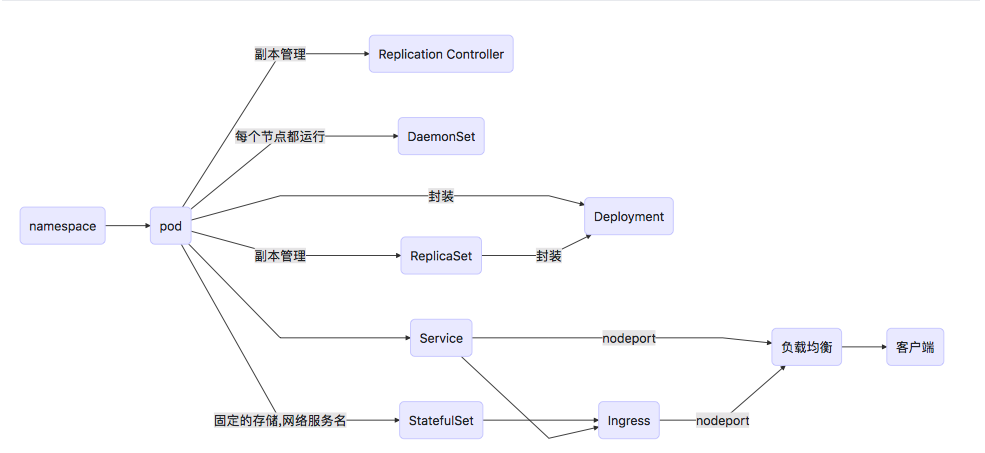
pod
1
2
3
A pod is a group of one or more tightly related containers that will always run together on the same worker node and in the same Linux namespace(s).

Each pod is like a separate logical machine with its own IP, hostname, processes, etc., running a single application.
- liveness
The kubelet uses liveness probes to know when to restart a Container.
- readiness
The kubelet uses readiness probes to know when a Container is ready to start accepting traffic.
- 问题:如果删除一个pod 是先从endpoint里移除pod ip,还是 pod 先删除
个人见解:
删除一个pod的k8s内部流程
- 用户删除pod
- apiserver标记pod为’dead’状态
- kubelet删除pod 默认等待30s还在运行时 会强制关闭pod 3.1 kubelet等待pod中容器的 prestop 执行结束 3.2 发送 sigterm 信号 让容器关闭 3.3 超过30s等待时间 发送 sigkill 信号强制pod关闭
- nodecontroller中的endpoint controller从endpoint中删除此pod
3 4 步骤同时进行 一般情况下4肯定会先于3完成,由于 3 4 顺序不定 极端情况下可能存在 kubelet已经删除了pod,而endpoint controller仍然存在此pod,会导致svc请求会转发到已经删除的pod上,从而导致调用svc出错
参考链接 https://kubernetes.io/docs/concepts/workloads/pods/pod/#termination-of-pods
参考链接:
Deployment
1
A Deployment controller provides declarative updates for Pods and ReplicaSets.
- Rolling Update
1
2
    #只适用于pod 里面只包含一个 container 的情况
    kubectl rolling-update NAME [NEW_NAME] --image=IMAGE:TAG
Init Containers 用来作初始化环境的容器
参考:
- Assign CPU Resources to Containers and Pods
- Kubernetes deployment strategies
- Autoscaling based on CPU/Memory in Kubernetes — Part II
- Assigning Pods to Nodes
- 资源不够时deployment无法更新
0/6 nodes are available: 3 Insufficient memory, 3 node(s) had taints that the pod didn’t tolerate.
Replication Controller
1
2
3
A replication controller is a Kubernetes resource that ensures a pod is always up and running.

-> label
ReplicaSet(副本集)
1
Replication Controller(副本控制器)的替代产物
| k8s组件 | pod selector |
|---|---|
| Replication Controller | label |
| ReplicaSet | label ,pods that include a certain label key |
参考链接:
DaemonSet(守护进程集)
1
A DaemonSet makes sure it creates as many pods as there are nodes and deploys each one on its own node
- 健康检查
- liveness probe
- HTTP-based liveness probe
StatefulSet(有状态副本集)
1
Manages the deployment and scaling of a set of Pods , and provides guarantees about the ordering and uniqueness of these Pods.
参考:
volumes
volumes有2种模式
In-tree是 Kubernetes 标准版的一部分,已经写入 Kubernetes 代码中。 Out-of-tree 是通过 Flexvolume 接口实现的,Flexvolume 可以使得用户在 Kubernetes 内自己编写驱动或添加自有数据卷的支持。
- emptyDir – a simple empty directory used for storing transient data,
- hostPath – for mounting directories from the worker node’s filesystem into the pod,
- gitRepo – a volume initialized by checking out the contents of a Git repository,
- nfs – an NFS share mounted into the pod,
- gcePersistentDisk (Google Compute Engine Persistent Disk), awsElasticBlockStore (Amazon Web Services Elastic Block Store Volume), azureDisk (Microsoft Azure Disk Volume) – for mounting cloud provider specific storage,
- cinder, cephfs, iscsi, flocker, glusterfs, quobyte, rbd, flexVolume, vsphereVolume, photonPersistentDisk, scaleIO – for mounting other types of network storage,
- configMap, secret, downwardAPI – special types of volumes used to expose certain Kubernetes resources and cluster info to the pod,
- persistentVolumeClaim – a way to use a pre- or dynamically provisioned persistent storage (we’ll talk about them in the last section of this chapter).
-
Persistent Volume 持久卷,就是将数据存储放到对应的外部可靠存储中,然后提供给Pod/容器使用,而无需先将外部存储挂在到主机上再提供给容器。它最大的特点是其生命周期与Pod不关联,在Pod死掉的时候它依然存在,在Pod恢复的时候自动恢复关联。
-
Persistent Volume Claim 用来申明它将从PV或者Storage Class资源里获取某个存储大小的空间。
参考:
ConfigMap
ConfigMap是用来存储配置文件的kubernetes资源对象,所有的配置内容都存储在etcd中.
实践证明修改 ConfigMap 无法更新容器中已注入的环境变量信息。
参考:
service
A Kubernetes service is a resource you create to get a single, constant point of entry to a group of pods providing the same service.
Each service has an IP address and port that never change while the service exists.
The resources will be created in the order they appear in the file. Therefore, it’s best to specify the service first, since that will ensure the scheduler can spread the pods associated with the service as they are created by the controller(s), such as Deployment.
- ClusterIP
集群内部访问用,外部可直接访问
当type不指定时,创建的就是这一类型的服务
clusterIP: None是一种特殊的headless-service,特点是没有clusterIP
- NodePort
每个节点都会开相同的端口,所以叫NodePort.有数量限制.外部可直接访问
- LoadBalancer
特定云产商的服务.如果是阿里云,就是在NodePort的基础上,帮你自动绑定负载均衡的后端服务器而已
- ExternalName
参考:
Horizontal Pod Autoscaler
1
The Horizontal Pod Autoscaler automatically scales the number of pods in a replication controller, deployment or replica set based on observed CPU utilization (or, with custom metrics support, on some other application-provided metrics).
配合metrics APIs以及resource 里面的 request 资源进行调整.
Kubernetes Downward API
1
It allows us to pass metadata about the pod and its environment through environment variables or files (in a so- called downwardAPI volume)
- environment variables
- downwardAPI volume
Resource Quotas
基于namespace限制pod资源的一种手段
网络模型
参考命令:
Some Useful Tools
Can be used to convert docker-compose files, very helpful for beginners learning Kubernetes.
Installation Tools
References:
Advanced Scheduling
Each type of affinity has 2 contexts: preferred and required. Preferred indicates preference, while required is mandatory.
Using Affinity to Ensure Pods Run on Target Nodes
1
2
3
4
5
6
        nodeAffinity:
          requiredDuringSchedulingIgnoredDuringExecution:
            nodeSelectorTerms:
            - matchExpressions:
              - key: elasticsearch-test-ready
                operator: Exists
Reference Links:
Using Anti-Affinity to Ensure Only One Application Runs Per Node
1
2
3
4
5
6
7
8
9
10
11
12
      affinity:
        podAntiAffinity:
          requiredDuringSchedulingIgnoredDuringExecution:
          - labelSelector:
              matchExpressions:
              - key: 'app'
                operator: In
                values:
                - nginx-test2
            topologyKey: "kubernetes.io/hostname"
            namespaces:
            - test
1
2
3
4
5
6
7
8
9
10
11
12
13
14
      affinity:
        podAntiAffinity:
          preferredDuringSchedulingIgnoredDuringExecution:
          - weight: 100
            podAffinityTerm:
              topologyKey: "kubernetes.io/hostname"
              namespaces:
              - test
              labelSelector:
                matchExpressions:
                - key: 'app'
                  operator: In
                  values:
                   - "nginx-test2"
Tolerations and Taints
Tolerations and taints always exist in pairs. Taint is like “Although I’m rude, smoke, and spend all my money, I’m still a good woman.” This kind of taint usually makes ordinary men (pods) keep their distance, but there are always a few honest people who can tolerate (tolerations) it.
Taint
1
2
kubectl taint nodes xx  elasticsearch-test-ready=true:NoSchedule
kubectl taint nodes xx  elasticsearch-test-ready:NoSchedule-
Master nodes come with taints by default, which is why containers we deploy won’t run on master nodes. But if you customize taint, be careful! All DaemonSet and kube-system components need to have corresponding tolerations. Otherwise, that node will evict all containers without this tolerations, including network plugins and kube-proxy. The consequences are quite serious, please be careful.
taint and tolerations exist in pairs, and operators cannot be used randomly.
Tolerations
NoExecute
1
2
3
4
5
      tolerations:
        - key: "elasticsearch-exclusive"
          operator: "Equal"
          value: "true"
          effect: "NoExecute"
kubectl taint node cn-shenzhen.xxxx elasticsearch-exclusive=true:NoExecute
NoExecute immediately evicts pods that don’t meet the tolerance conditions. This operation is very dangerous. Please make sure system components have corresponding tolerations configured first.
Note that using the Exists operator is invalid here, you must use Equal.
NoSchedule
1
2
3
4
5
6
7
8
      tolerations:
        - key: "elasticsearch-exclusive"
          operator: "Exists"
          effect: "NoSchedule"
        - key: "elasticsearch-exclusive"
          operator: "Equal"
          value: "true"
          effect: "NoExecute"
kubectl taint node cn-shenzhen.xxxx elasticsearch-exclusive=true:NoSchedule
This tries to avoid scheduling pods here, but pods can still run on it.
Exists and Equal can be used freely, it doesn’t matter much.
It’s worth mentioning that the same key can have multiple effects simultaneously.
1
2
Taints:             elasticsearch-exclusive=true:NoExecute
                    elasticsearch-exclusive=true:NoSchedule
Other Reference Links:
Container Orchestration Tips
wait-for-it
k8s currently doesn’t have a dependency startup mechanism like docker-compose’s depends_on. It’s recommended to use wait-for-it to rewrite the image’s command.
Using Double Quotes in cmd
1
2
3
4
5
6
7

               - "/bin/sh"
               - "-ec"
               - |
                  curl -X POST --connect-timeout 5 -H 'Content-Type: application/json' \
                  elasticsearch-logs:9200/logs,tracing,tracing-test/_delete_by_query?conflicts=proceed  \
                  -d '{"query":{"range":{"@timestamp":{"lt":"now-90d","format": "epoch_millis"}}}}'
k8s Master-Cluster Architecture
Master (CONTROL PLANE)
-
etcd distributed persistent storage
Consistent and highly-available key value store used as Kubernetes’ backing store for all cluster data.
-
kube-apiserver
front-end for the Kubernetes control plane.
-
kube-scheduler
Component on the master that watches newly created pods that have no node assigned, and selects a node for them to run on.
- Controller Manager
-
Node Controller
Responsible for noticing and responding when nodes go down.
-
Replication Controller
Responsible for maintaining the correct number of pods for every replication controller object in the system.
-
Endpoints Controller
Populates the Endpoints object (that is, joins Services & Pods).
-
Service Account & Token Controllers
Create default accounts and API access tokens for new namespaces.
-
- cloud-controller-manager(alpha feature)
-
Node Controller
For checking the cloud provider to determine if a node has been deleted in the cloud after it stops responding
-
Route Controller
For setting up routes in the underlying cloud infrastructure
-
Service Controller
For creating, updating and deleting cloud provider load balancers
-
Volume Controller
For creating, attaching, and mounting volumes, and interacting with the cloud provider to orchestrate volumes
-
Reference Links:
Worker Nodes
-
Kubelet
The kubelet is the primary “node agent” that runs on each node.
-
Kubernetes Proxy
kube-proxy enables the Kubernetes service abstraction by maintaining network rules on the host and performing connection forwarding.
-
Container Runtime (Docker, rkt, or others)
The container runtime is the software that is responsible for running containers. Kubernetes supports several runtimes: Docker, rkt, runc and any OCI runtime-spec implementation.
Kubernetes Resources
- spec
The spec, which you must provide, describes your desired state for the object–the characteristics that you want the object to have.
- status
The status describes the actual state of the object, and is supplied and updated by the Kubernetes system.
Pod
1
2
3
A pod is a group of one or more tightly related containers that will always run together on the same worker node and in the same Linux namespace(s).

Each pod is like a separate logical machine with its own IP, hostname, processes, etc., running a single application.
- liveness
The kubelet uses liveness probes to know when to restart a Container.
- readiness
The kubelet uses readiness probes to know when a Container is ready to start accepting traffic.
- Question: If you delete a pod, is the pod IP removed from the endpoint first, or is the pod deleted first?
Personal Understanding:
The internal process of deleting a pod in k8s:
- User deletes pod
- apiserver marks pod as ‘dead’ state
- kubelet deletes pod, waits 30s by default, if still running, will force close pod 3.1 kubelet waits for prestop in pod containers to finish executing 3.2 sends sigterm signal to close containers 3.3 after 30s wait time, sends sigkill signal to force close pod
- endpoint controller in nodecontroller removes this pod from endpoint
Steps 3 and 4 proceed simultaneously. Generally, step 4 will definitely complete before step 3. Since steps 3 and 4 are not in a fixed order, in extreme cases, kubelet may have already deleted the pod, but the endpoint controller still has this pod, which will cause svc requests to be forwarded to an already deleted pod, resulting in svc call errors.
Reference link https://kubernetes.io/docs/concepts/workloads/pods/pod/#termination-of-pods
Reference Links:
- Using Pod Data in Containers
- Using Service Account to Access API Server in Kubernetes Pod
- Graceful Pod Shutdown
Deployment
1
A Deployment controller provides declarative updates for Pods and ReplicaSets.
- Rolling Update
1
2
    # Only applicable when pod contains only one container
    kubectl rolling-update NAME [NEW_NAME] --image=IMAGE:TAG
Init Containers are containers used to initialize the environment.
Reference:
- Assign CPU Resources to Containers and Pods
- Kubernetes deployment strategies
- Autoscaling based on CPU/Memory in Kubernetes — Part II
- Assigning Pods to Nodes
- Deployment cannot update when resources are insufficient
0/6 nodes are available: 3 Insufficient memory, 3 node(s) had taints that the pod didn’t tolerate.
Replication Controller
1
2
3
A replication controller is a Kubernetes resource that ensures a pod is always up and running.

-> label
ReplicaSet
1
Replacement for Replication Controller
| k8s Component | pod selector |
|---|---|
| Replication Controller | label |
| ReplicaSet | label, pods that include a certain label key |
Reference Links:
DaemonSet
1
A DaemonSet makes sure it creates as many pods as there are nodes and deploys each one on its own node
- Health Checks
- liveness probe
- HTTP-based liveness probe
StatefulSet
1
Manages the deployment and scaling of a set of Pods, and provides guarantees about the ordering and uniqueness of these Pods.
Reference:
Volumes
Volumes have 2 modes
In-tree is part of the Kubernetes standard version, already written into Kubernetes code. Out-of-tree is implemented through the Flexvolume interface. Flexvolume allows users to write their own drivers or add support for their own data volumes within Kubernetes.
- emptyDir – a simple empty directory used for storing transient data,
- hostPath – for mounting directories from the worker node’s filesystem into the pod,
- gitRepo – a volume initialized by checking out the contents of a Git repository,
- nfs – an NFS share mounted into the pod,
- gcePersistentDisk (Google Compute Engine Persistent Disk), awsElasticBlockStore (Amazon Web Services Elastic Block Store Volume), azureDisk (Microsoft Azure Disk Volume) – for mounting cloud provider specific storage,
- cinder, cephfs, iscsi, flocker, glusterfs, quobyte, rbd, flexVolume, vsphereVolume, photonPersistentDisk, scaleIO – for mounting other types of network storage,
- configMap, secret, downwardAPI – special types of volumes used to expose certain Kubernetes resources and cluster info to the pod,
- persistentVolumeClaim – a way to use a pre- or dynamically provisioned persistent storage (we’ll talk about them in the last section of this chapter).
-
Persistent Volume Persistent volumes store data in corresponding external reliable storage, then provide it to Pods/containers for use, without needing to mount external storage to the host first and then provide it to containers. Its biggest feature is that its lifecycle is not associated with Pods. When a Pod dies, it still exists. When a Pod recovers, it automatically restores the association.
-
Persistent Volume Claim Used to declare that it will obtain a certain storage size space from PV or Storage Class resources.
Reference:
ConfigMap
ConfigMap is a Kubernetes resource object used to store configuration files. All configuration content is stored in etcd.
Practice has proven that modifying ConfigMap cannot update environment variable information already injected into containers.
Reference:
Service
A Kubernetes service is a resource you create to get a single, constant point of entry to a group of pods providing the same service.
Each service has an IP address and port that never change while the service exists.
The resources will be created in the order they appear in the file. Therefore, it’s best to specify the service first, since that will ensure the scheduler can spread the pods associated with the service as they are created by the controller(s), such as Deployment.
- ClusterIP
For cluster internal access, can be directly accessed externally.
When type is not specified, this type of service is created.
clusterIP: None is a special headless-service, characterized by having no clusterIP.
- NodePort
Each node will open the same port, so it’s called NodePort. There are quantity limits. Can be directly accessed externally.
- LoadBalancer
Specific cloud provider service. If it’s Alibaba Cloud, it’s just automatically binding the backend servers of the load balancer on top of NodePort.
- ExternalName
Reference:
Horizontal Pod Autoscaler
1
The Horizontal Pod Autoscaler automatically scales the number of pods in a replication controller, deployment or replica set based on observed CPU utilization (or, with custom metrics support, on some other application-provided metrics).
Works with metrics APIs and request resources in resources for adjustment.
Kubernetes Downward API
1
It allows us to pass metadata about the pod and its environment through environment variables or files (in a so- called downwardAPI volume)
- environment variables
- downwardAPI volume
Resource Quotas
A means of limiting pod resources based on namespace
Network Model
Kubernetes Network Model Principles
Reference Commands:
- kubectl Command Guide
- Kubernetes and Docker Basic Concepts and Common Commands Comparison
- kubectl Cheat Sheet
- K8S Resource Configuration Guide
- Introducing Container Runtime Interface (CRI) in Kubernetes
Reference E-books: Kubernetes Handbook——Kubernetes Chinese Guide/Cloud Native Application Architecture Practice Manual
いくつかの便利なツール
docker-composeファイルの変換に使用でき、Kubernetesを学び始める人にとって非常に役立ちます。
インストールツール
参考:
高度なスケジューリング
各タイプのアフィニティには2つのコンテキストがあります:preferredとrequired。preferredは傾向を示し、requiredは必須です。
アフィニティを使用してポッドがターゲットノードで実行されるようにする
1
2
3
4
5
6
        nodeAffinity:
          requiredDuringSchedulingIgnoredDuringExecution:
            nodeSelectorTerms:
            - matchExpressions:
              - key: elasticsearch-test-ready
                operator: Exists
参考リンク:
アンチアフィニティを使用して各ノードで1つのアプリケーションのみが実行されるようにする
1
2
3
4
5
6
7
8
9
10
11
12
      affinity:
        podAntiAffinity:
          requiredDuringSchedulingIgnoredDuringExecution:
          - labelSelector:
              matchExpressions:
              - key: 'app'
                operator: In
                values:
                - nginx-test2
            topologyKey: "kubernetes.io/hostname"
            namespaces:
            - test
1
2
3
4
5
6
7
8
9
10
11
12
13
14
      affinity:
        podAntiAffinity:
          preferredDuringSchedulingIgnoredDuringExecution:
          - weight: 100
            podAffinityTerm:
              topologyKey: "kubernetes.io/hostname"
              namespaces:
              - test
              labelSelector:
                matchExpressions:
                - key: 'app'
                  operator: In
                  values:
                   - "nginx-test2"
tolerations と taint
tolerations と taint は常にペアで存在します。taint は「私は粗野で、タバコを吸い、浪費家ですが、それでも良い女性です」のようなものです。この種のtaint(汚点)は通常、一般的な男性(pod)を遠ざけますが、常にそれを許容(tolerations)できる誠実な人が何人かいます。
taint
1
2
kubectl taint nodes xx  elasticsearch-test-ready=true:NoSchedule
kubectl taint nodes xx  elasticsearch-test-ready:NoSchedule-
masterノードはデフォルトでtaintが付いているため、デプロイしたコンテナがmasterノードで実行されない理由です。しかし、taintをカスタマイズする場合は注意してください!すべてのDaemonSetとkube-systemコンポーネントには、対応するtolerationsが必要です。そうしないと、そのノードはこのtolerationsを持たないすべてのコンテナを追放し、ネットワークプラグインやkube-proxyも含まれます。結果は非常に深刻ですので、注意してください。
taintとtolerationsはペアで対応して存在し、演算子も乱用できません。
tolerations
NoExecute
1
2
3
4
5
      tolerations:
        - key: "elasticsearch-exclusive"
          operator: "Equal"
          value: "true"
          effect: "NoExecute"
kubectl taint node cn-shenzhen.xxxx elasticsearch-exclusive=true:NoExecute
NoExecuteは、許容条件を満たさないpodを即座に追放します。この操作は非常に危険です。まず、システムコンポーネントに対応するtolerationsが設定されていることを確認してください。
特に注意:Exists演算子は無効です。Equalを使用する必要があります。
NoSchedule
1
2
3
4
5
6
7
8
      tolerations:
        - key: "elasticsearch-exclusive"
          operator: "Exists"
          effect: "NoSchedule"
        - key: "elasticsearch-exclusive"
          operator: "Equal"
          value: "true"
          effect: "NoExecute"
kubectl taint node cn-shenzhen.xxxx elasticsearch-exclusive=true:NoSchedule
ここにスケジュールしないようにしますが、実際にはまだその上でpodが実行される可能性があります。
ExistsとEqualは自由に使用でき、それほど影響はありません。
同じキーが複数のeffectを同時に持つことができることは言及する価値があります。
1
2
Taints:             elasticsearch-exclusive=true:NoExecute
                    elasticsearch-exclusive=true:NoSchedule
その他の参考リンク:
コンテナオーケストレーションのテクニック
wait-for-it
k8sには現在、docker-composeのdepends_onのような依存起動メカニズムがありません。wait-for-itを使用してイメージのcommandを書き直すことをお勧めします。
cmdで二重引用符を使用する方法
1
2
3
4
5
6
7

               - "/bin/sh"
               - "-ec"
               - |
                  curl -X POST --connect-timeout 5 -H 'Content-Type: application/json' \
                  elasticsearch-logs:9200/logs,tracing,tracing-test/_delete_by_query?conflicts=proceed  \
                  -d '{"query":{"range":{"@timestamp":{"lt":"now-90d","format": "epoch_millis"}}}}'
k8sのmaster-clusterアーキテクチャ
master(CONTROL PLANE)
-
etcd distributed persistent storage
Kubernetesのすべてのクラスターデータのバッキングストアとして使用される一貫性と高可用性のキー値ストア。
-
kube-apiserver
Kubernetesコントロールプレーンのフロントエンド。
-
kube-scheduler
マスター上のコンポーネントで、割り当てられたノードがない新しく作成されたpodを監視し、それらが実行するノードを選択します。
- Controller Manager
-
Node Controller
ノードがダウンしたときに気づいて対応する責任があります。
-
Replication Controller
システム内のすべてのレプリケーションコントローラーオブジェクトに対して、正しい数のpodを維持する責任があります。
-
Endpoints Controller
Endpointsオブジェクトを埋めます(つまり、ServicesとPodsを結合します)。
-
Service Account & Token Controllers
新しい名前空間のデフォルトアカウントとAPIアクセストークンを作成します。
-
- cloud-controller-manager(alpha feature)
-
Node Controller
クラウドプロバイダーをチェックして、ノードが応答を停止した後にクラウドで削除されたかどうかを判断するため
-
Route Controller
基盤となるクラウドインフラストラクチャでルートを設定するため
-
Service Controller
クラウドプロバイダーのロードバランサーを作成、更新、削除するため
-
Volume Controller
ボリュームを作成、アタッチ、マウントし、クラウドプロバイダーと対話してボリュームをオーケストレートするため
-
参考リンク:
worker nodes
-
Kubelet
kubeletは各ノードで実行される主要な「ノードエージェント」です。
-
Kubernetes Proxy
kube-proxyは、ホスト上のネットワークルールを維持し、接続転送を実行することで、Kubernetesサービス抽象化を有効にします。
-
Container Runtime (Docker, rkt, その他)
コンテナランタイムは、コンテナの実行を担当するソフトウェアです。Kubernetesはいくつかのランタイムをサポートしています:Docker、rkt、runc、およびOCI runtime-spec実装。
kubernetesのリソース
- spec
提供する必要があるspecは、オブジェクトの希望する状態、つまりオブジェクトに持たせたい特性を記述します。
- status
statusはオブジェクトの実際の状態を記述し、Kubernetesシステムによって提供および更新されます。
pod
1
2
3
podは、常に同じワーカーノード上で同じLinux名前空間内で一緒に実行される、1つ以上の密接に関連するコンテナのグループです。

各podは、単一のアプリケーションを実行する独自のIP、ホスト名、プロセスなどを備えた別個の論理マシンのようなものです。
- liveness
kubeletはlivenessプローブを使用して、コンテナを再起動するタイミングを判断します。
- readiness
kubeletはreadinessプローブを使用して、コンテナがトラフィックの受け入れを開始する準備ができているタイミングを判断します。
- 問題:podを削除する場合、endpointからpod ipを先に削除するか、podを先に削除するか
個人的な見解:
podを削除するk8sの内部プロセス
- ユーザーがpodを削除
- apiserverがpodを’dead’状態としてマーク
- kubeletがpodを削除、デフォルトで30秒待機、まだ実行中の場合はpodを強制終了 3.1 kubeletがpod内のコンテナのprestopの実行終了を待機 3.2 sigterm信号を送信してコンテナを閉じる 3.3 30秒の待機時間を超えると、sigkill信号を送信してpodを強制終了
- nodecontroller内のendpoint controllerがendpointからこのpodを削除
3と4のステップは同時に進行します。一般的に、4は3より先に完了します。3と4の順序が不定のため、極端な場合、kubeletがすでにpodを削除したが、endpoint controllerがまだこのpodを持っている可能性があり、svcリクエストがすでに削除されたpodに転送され、svc呼び出しエラーが発生する可能性があります。
参考リンク https://kubernetes.io/docs/concepts/workloads/pods/pod/#termination-of-pods
参考リンク:
Deployment
1
Deploymentコントローラーは、PodとReplicaSetの宣言的更新を提供します。
- Rolling Update
1
2
    # pod内に1つのcontainerのみが含まれる場合にのみ適用
    kubectl rolling-update NAME [NEW_NAME] --image=IMAGE:TAG
Init Containers は初期化環境を作成するために使用されるコンテナです。
参考:
- リソースが不足している場合、deploymentは更新できません
0/6 nodes are available: 3 Insufficient memory, 3 node(s) had taints that the pod didn’t tolerate.
Replication Controller
1
2
3
レプリケーションコントローラーは、podが常に稼働していることを保証するKubernetesリソースです。

-> label
ReplicaSet(レプリカセット)
1
Replication Controller(レプリケーションコントローラー)の代替品
| k8sコンポーネント | pod selector |
|---|---|
| Replication Controller | label |
| ReplicaSet | label、特定のラベルキーを含むpod |
参考リンク:
DaemonSet(デーモンセット)
1
DaemonSetは、ノードと同じ数のpodを作成し、それぞれを独自のノードにデプロイすることを確認します
- ヘルスチェック
- liveness probe
- HTTPベースのliveness probe
StatefulSet(ステートフルレプリカセット)
1
Podのセットのデプロイメントとスケーリングを管理し、これらのPodの順序と一意性について保証を提供します。
参考:
volumes
volumesには2つのモードがあります
In-treeはKubernetes標準版の一部で、すでにKubernetesコードに書き込まれています。 Out-of-treeはFlexvolumeインターフェースを通じて実装されます。Flexvolumeにより、ユーザーはKubernetes内で独自のドライバーを記述したり、独自のデータボリュームのサポートを追加したりできます。
- emptyDir – 一時データを保存するために使用されるシンプルな空のディレクトリ、
- hostPath – ワーカーノードのファイルシステムからディレクトリをpodにマウントするため、
- gitRepo – Gitリポジトリの内容をチェックアウトして初期化されたボリューム、
- nfs – podにマウントされたNFS共有、
- gcePersistentDisk (Google Compute Engine Persistent Disk), awsElasticBlockStore (Amazon Web Services Elastic Block Store Volume), azureDisk (Microsoft Azure Disk Volume) – クラウドプロバイダー固有のストレージをマウントするため、
- cinder, cephfs, iscsi, flocker, glusterfs, quobyte, rbd, flexVolume, vsphereVolume, photonPersistentDisk, scaleIO – 他のタイプのネットワークストレージをマウントするため、
- configMap, secret, downwardAPI – 特定の Kubernetesリソースとクラスター情報をpodに公開するために使用される特別なタイプのボリューム、
- persistentVolumeClaim – 事前または動的にプロビジョニングされた永続 ストレージを使用する方法(この章の最後のセクションで説明します)。
-
Persistent Volume 永続ボリュームは、データストレージを対応する外部の信頼性の高いストレージに配置し、Pod/コンテナに提供して使用できるようにします。ホストに外部ストレージをマウントしてからコンテナに提供する必要はありません。その最大の特徴は、ライフサイクルがPodに関連付けられていないことです。Podが死んでも依然として存在し、Podが回復すると自動的に関連付けが復元されます。
-
Persistent Volume Claim PVまたはStorage Classリソースから特定のストレージサイズのスペースを取得することを宣言するために使用されます。
参考:
ConfigMap
ConfigMapは、設定ファイルを保存するために使用されるKubernetesリソースオブジェクトで、すべての設定内容がetcdに保存されます。
実践により、ConfigMapを変更しても、コンテナにすでに注入された環境変数情報を更新できないことが証明されています。
参考:
service
Kubernetesサービスは、同じサービスを提供するpodのグループへの単一の一定のエントリーポイントを取得するために作成するリソースです。
各サービスには、サービスが存在する限り変更されないIPアドレスとポートがあります。
リソースは、ファイルに表示される順序で作成されます。したがって、サービスを最初に指定するのが最善です。これにより、スケジューラーが、Deploymentなどのコントローラーによって作成されるときに、サービスに関連付けられたpodを分散できることが保証されます。
- ClusterIP
クラスター内部アクセス用、外部から直接アクセス可能
typeが指定されていない場合、このタイプのサービスが作成されます
clusterIP: Noneは特別なheadless-serviceで、clusterIPがないことが特徴です
- NodePort
各ノードは同じポートを開くため、NodePortと呼ばれます。数量制限があります。外部から直接アクセス可能
- LoadBalancer
特定のクラウドプロバイダーのサービス。阿里云の場合、NodePortの上にロードバランサーのバックエンドサーバーを自動的にバインドするだけです
- ExternalName
参考:
Horizontal Pod Autoscaler
1
Horizontal Pod Autoscalerは、観測されたCPU使用率(または、カスタムメトリクスサポートにより、他のアプリケーション提供のメトリクス)に基づいて、レプリケーションコントローラー、デプロイメント、またはレプリカセット内のpodの数を自動的にスケーリングします。
メトリクスAPIとリソース内のrequestリソースと連携して調整します。
Kubernetes Downward API
1
podとその環境に関するメタデータを環境変数またはファイル(いわゆるdownwardAPIボリューム)を通じて渡すことができます
- environment variables
- downwardAPI volume
Resource Quotas
名前空間に基づいてpodリソースを制限する手段
ネットワークモデル
参考コマンド:
- kubectlコマンドガイド
- KubernetesとDockerの基本概念と一般的なコマンドの比較
- kubectl Cheat Sheet
- K8Sリソース設定ガイド
- KubernetesでのContainer Runtime Interface (CRI)の紹介
参考電子書籍: Kubernetes Handbook——Kubernetes日本語ガイド/クラウドネイティブアプリケーションアーキテクチャ実践マニュアル
Некоторые полезные инструменты
Может использоваться для преобразования файлов docker-compose, очень полезно для начинающих изучать Kubernetes.
Инструменты установки
Ссылки:
Продвинутое планирование
Каждый тип сродства имеет 2 контекста: preferred и required. Preferred указывает предпочтение, а required является обязательным.
Использование сродства для обеспечения запуска подов на целевых узлах
1
2
3
4
5
6
        nodeAffinity:
          requiredDuringSchedulingIgnoredDuringExecution:
            nodeSelectorTerms:
            - matchExpressions:
              - key: elasticsearch-test-ready
                operator: Exists
Ссылки:
Использование антисродства для обеспечения запуска только одного приложения на каждом узле
1
2
3
4
5
6
7
8
9
10
11
12
      affinity:
        podAntiAffinity:
          requiredDuringSchedulingIgnoredDuringExecution:
          - labelSelector:
              matchExpressions:
              - key: 'app'
                operator: In
                values:
                - nginx-test2
            topologyKey: "kubernetes.io/hostname"
            namespaces:
            - test
1
2
3
4
5
6
7
8
9
10
11
12
13
14
      affinity:
        podAntiAffinity:
          preferredDuringSchedulingIgnoredDuringExecution:
          - weight: 100
            podAffinityTerm:
              topologyKey: "kubernetes.io/hostname"
              namespaces:
              - test
              labelSelector:
                matchExpressions:
                - key: 'app'
                  operator: In
                  values:
                   - "nginx-test2"
Tolerations и Taints
Tolerations и taints всегда существуют парами. Taint похож на “Хотя я груб, курю и трачу все деньги, я все еще хорошая женщина.” Этот вид taint обычно заставляет обычных мужчин (поды) держаться на расстоянии, но всегда есть несколько честных людей, которые могут терпеть (tolerations) это.
Taint
1
2
kubectl taint nodes xx  elasticsearch-test-ready=true:NoSchedule
kubectl taint nodes xx  elasticsearch-test-ready:NoSchedule-
Мастер-узлы поставляются с taints по умолчанию, поэтому контейнеры, которые мы развертываем, не будут работать на мастер-узлах. Но если вы настраиваете taint, будьте осторожны! Все компоненты DaemonSet и kube-system должны иметь соответствующие tolerations. В противном случае этот узел выгонит все контейнеры без этого tolerations, включая сетевые плагины и kube-proxy. Последствия довольно серьезны, пожалуйста, будьте осторожны.
taint и tolerations существуют парами, и операторы не могут использоваться случайным образом.
Tolerations
NoExecute
1
2
3
4
5
      tolerations:
        - key: "elasticsearch-exclusive"
          operator: "Equal"
          value: "true"
          effect: "NoExecute"
kubectl taint node cn-shenzhen.xxxx elasticsearch-exclusive=true:NoExecute
NoExecute немедленно выгоняет поды, которые не соответствуют условиям толерантности. Эта операция очень опасна. Пожалуйста, сначала убедитесь, что системные компоненты имеют соответствующие tolerations настроены.
Обратите внимание, что использование оператора Exists здесь недействительно, вы должны использовать Equal.
NoSchedule
1
2
3
4
5
6
7
8
      tolerations:
        - key: "elasticsearch-exclusive"
          operator: "Exists"
          effect: "NoSchedule"
        - key: "elasticsearch-exclusive"
          operator: "Equal"
          value: "true"
          effect: "NoExecute"
kubectl taint node cn-shenzhen.xxxx elasticsearch-exclusive=true:NoSchedule
Это пытается избежать планирования подов здесь, но поды все еще могут работать на нем.
Exists и Equal могут использоваться свободно, это не имеет большого значения.
Стоит упомянуть, что один и тот же ключ может иметь несколько эффектов одновременно.
1
2
Taints:             elasticsearch-exclusive=true:NoExecute
                    elasticsearch-exclusive=true:NoSchedule
Другие ссылки:
Советы по оркестрации контейнеров
wait-for-it
k8s в настоящее время не имеет механизма зависимого запуска, подобного depends_on docker-compose. Рекомендуется использовать wait-for-it для переписывания команды образа.
Использование двойных кавычек в cmd
1
2
3
4
5
6
7

               - "/bin/sh"
               - "-ec"
               - |
                  curl -X POST --connect-timeout 5 -H 'Content-Type: application/json' \
                  elasticsearch-logs:9200/logs,tracing,tracing-test/_delete_by_query?conflicts=proceed  \
                  -d '{"query":{"range":{"@timestamp":{"lt":"now-90d","format": "epoch_millis"}}}}'
Архитектура k8s Master-Cluster
Master (CONTROL PLANE)
-
etcd distributed persistent storage
Согласованное и высокодоступное хранилище ключ-значение, используемое как резервное хранилище Kubernetes для всех данных кластера.
-
kube-apiserver
интерфейс для плоскости управления Kubernetes.
-
kube-scheduler
Компонент на мастере, который следит за вновь созданными подами, которым не назначен узел, и выбирает узел для их запуска.
- Controller Manager
-
Node Controller
Отвечает за обнаружение и реагирование, когда узлы выходят из строя.
-
Replication Controller
Отвечает за поддержание правильного количества подов для каждого объекта контроллера репликации в системе.
-
Endpoints Controller
Заполняет объект Endpoints (то есть объединяет Services и Pods).
-
Service Account & Token Controllers
Создает учетные записи по умолчанию и токены доступа API для новых пространств имен.
-
- cloud-controller-manager(alpha feature)
-
Node Controller
Для проверки облачного провайдера, чтобы определить, был ли узел удален в облаке после того, как он перестал отвечать
-
Route Controller
Для настройки маршрутов в базовой облачной инфраструктуре
-
Service Controller
Для создания, обновления и удаления балансировщиков нагрузки облачного провайдера
-
Volume Controller
Для создания, подключения и монтирования томов, а также взаимодействия с облачным провайдером для оркестрации томов
-
Ссылки:
Worker Nodes
-
Kubelet
kubelet — это основной “агент узла”, который работает на каждом узле.
-
Kubernetes Proxy
kube-proxy обеспечивает абстракцию службы Kubernetes, поддерживая сетевые правила на хосте и выполняя пересылку соединений.
-
Container Runtime (Docker, rkt или другие)
Среда выполнения контейнеров — это программное обеспечение, отвечающее за запуск контейнеров. Kubernetes поддерживает несколько сред выполнения: Docker, rkt, runc и любую реализацию спецификации OCI runtime-spec.
Ресурсы Kubernetes
- spec
spec, который вы должны предоставить, описывает желаемое состояние объекта — характеристики, которые вы хотите, чтобы объект имел.
- status
status описывает фактическое состояние объекта и предоставляется и обновляется системой Kubernetes.
Pod
1
2
3
Pod — это группа из одного или нескольких тесно связанных контейнеров, которые всегда будут работать вместе на одном рабочем узле и в одном пространстве имен Linux.

Каждый pod похож на отдельную логическую машину со своим IP, именем хоста, процессами и т.д., запускающую одно приложение.
- liveness
kubelet использует liveness пробы, чтобы знать, когда перезапустить контейнер.
- readiness
kubelet использует readiness пробы, чтобы знать, когда контейнер готов начать принимать трафик.
- Вопрос: Если вы удаляете pod, IP пода сначала удаляется из endpoint, или pod сначала удаляется?
Личное понимание:
Внутренний процесс удаления пода в k8s:
- Пользователь удаляет pod
- apiserver помечает pod как состояние ‘dead’
- kubelet удаляет pod, ждет 30 секунд по умолчанию, если все еще работает, принудительно закроет pod 3.1 kubelet ждет завершения выполнения prestop в контейнерах пода 3.2 отправляет сигнал sigterm для закрытия контейнеров 3.3 после 30 секунд ожидания отправляет сигнал sigkill для принудительного закрытия пода
- контроллер endpoint в nodecontroller удаляет этот pod из endpoint
Шаги 3 и 4 выполняются одновременно. Как правило, шаг 4 определенно завершится раньше шага 3. Поскольку шаги 3 и 4 не в фиксированном порядке, в крайних случаях kubelet может уже удалить pod, но контроллер endpoint все еще имеет этот pod, что приведет к тому, что запросы svc будут перенаправлены на уже удаленный pod, что приведет к ошибкам вызова svc.
Ссылка https://kubernetes.io/docs/concepts/workloads/pods/pod/#termination-of-pods
Ссылки:
- Использование данных пода в контейнерах
- Использование Service Account для доступа к API Server в Kubernetes Pod
- Graceful Pod Shutdown
Deployment
1
Контроллер Deployment обеспечивает декларативные обновления для Pods и ReplicaSets.
- Rolling Update
1
2
    # Применимо только когда pod содержит только один контейнер
    kubectl rolling-update NAME [NEW_NAME] --image=IMAGE:TAG
Init Containers — это контейнеры, используемые для инициализации среды.
Ссылки:
- Назначение CPU ресурсов контейнерам и подам
- Стратегии развертывания Kubernetes
- Автомасштабирование на основе CPU/памяти в Kubernetes — Часть II
- Назначение подов узлам
- Deployment не может обновляться, когда ресурсов недостаточно
0/6 nodes are available: 3 Insufficient memory, 3 node(s) had taints that the pod didn’t tolerate.
Replication Controller
1
2
3
Контроллер репликации — это ресурс Kubernetes, который гарантирует, что pod всегда работает.

-> label
ReplicaSet
1
Замена для Replication Controller
| k8s Компонент | pod selector |
|---|---|
| Replication Controller | label |
| ReplicaSet | label, поды, которые включают определенный ключ метки |
Ссылки:
DaemonSet
1
DaemonSet гарантирует, что он создает столько подов, сколько узлов, и развертывает каждый на своем узле
- Проверки здоровья
- liveness probe
- HTTP-based liveness probe
StatefulSet
1
Управляет развертыванием и масштабированием набора Pods и предоставляет гарантии относительно порядка и уникальности этих Pods.
Ссылки:
volumes
volumes имеют 2 режима
In-tree является частью стандартной версии Kubernetes, уже записанной в код Kubernetes. Out-of-tree реализуется через интерфейс Flexvolume. Flexvolume позволяет пользователям писать свои собственные драйверы или добавлять поддержку своих собственных томов данных в Kubernetes.
- emptyDir – простой пустой каталог, используемый для хранения временных данных,
- hostPath – для монтирования каталогов из файловой системы рабочего узла в pod,
- gitRepo – том, инициализированный путем извлечения содержимого репозитория Git,
- nfs – общий ресурс NFS, смонтированный в pod,
- gcePersistentDisk (Google Compute Engine Persistent Disk), awsElasticBlockStore (Amazon Web Services Elastic Block Store Volume), azureDisk (Microsoft Azure Disk Volume) – для монтирования хранилища, специфичного для облачного провайдера,
- cinder, cephfs, iscsi, flocker, glusterfs, quobyte, rbd, flexVolume, vsphereVolume, photonPersistentDisk, scaleIO – для монтирования других типов сетевого хранилища,
- configMap, secret, downwardAPI – специальные типы томов, используемые для раскрытия определенных ресурсов Kubernetes и информации о кластере для пода,
- persistentVolumeClaim – способ использования предварительно или динамически подготовленного постоянного хранилища (мы поговорим о них в последнем разделе этой главы).
-
Persistent Volume Постоянные тома хранят данные в соответствующем внешнем надежном хранилище, а затем предоставляют их Pods/контейнерам для использования, без необходимости сначала монтировать внешнее хранилище на хост, а затем предоставлять его контейнерам. Его самая большая особенность заключается в том, что его жизненный цикл не связан с Pods. Когда Pod умирает, он все еще существует. Когда Pod восстанавливается, он автоматически восстанавливает ассоциацию.
-
Persistent Volume Claim Используется для объявления, что он получит определенное пространство размера хранилища из ресурсов PV или Storage Class.
Ссылки:
ConfigMap
ConfigMap — это объект ресурса Kubernetes, используемый для хранения файлов конфигурации. Весь контент конфигурации хранится в etcd.
Практика доказала, что изменение ConfigMap не может обновить информацию о переменных окружения, уже внедренную в контейнеры.
Ссылки:
service
Служба Kubernetes — это ресурс, который вы создаете для получения единой постоянной точки входа в группу подов, предоставляющих одну и ту же службу.
Каждая служба имеет IP-адрес и порт, которые никогда не меняются, пока служба существует.
Ресурсы будут создаваться в том порядке, в котором они появляются в файле. Поэтому лучше сначала указать службу, так как это обеспечит, что планировщик может распределить поды, связанные со службой, по мере их создания контроллерами, такими как Deployment.
- ClusterIP
Для внутреннего доступа к кластеру, может быть доступен напрямую извне.
Когда type не указан, создается этот тип службы.
clusterIP: None — это специальный headless-service, характеризующийся отсутствием clusterIP.
- NodePort
Каждый узел откроет тот же порт, поэтому он называется NodePort. Есть ограничения по количеству. Может быть доступен напрямую извне.
- LoadBalancer
Служба конкретного облачного провайдера. Если это Alibaba Cloud, это просто автоматическое привязывание серверов балансировщика нагрузки поверх NodePort.
- ExternalName
Ссылки:
Horizontal Pod Autoscaler
1
Horizontal Pod Autoscaler автоматически масштабирует количество подов в контроллере репликации, развертывании или наборе реплик на основе наблюдаемой загрузки CPU (или, с поддержкой пользовательских метрик, на некоторых других метриках, предоставляемых приложением).
Работает с API метрик и ресурсами запроса в ресурсах для корректировки.
Kubernetes Downward API
1
Он позволяет нам передавать метаданные о поде и его окружении через переменные окружения или файлы (в так называемом томе downwardAPI)
- environment variables
- downwardAPI volume
Resource Quotas
Средство ограничения ресурсов подов на основе пространства имен
Сетевая модель
Принципы сетевой модели Kubernetes
Справочные команды:
- Руководство по командам kubectl
- Сравнение основных концепций и общих команд Kubernetes и Docker
- Шпаргалка kubectl
- Руководство по конфигурации ресурсов K8S
- Введение в Container Runtime Interface (CRI) в Kubernetes
Справочные электронные книги: Kubernetes Handbook——Руководство по Kubernetes на китайском языке/Руководство по практике архитектуры облачных нативных приложений
💬 讨论 / Discussion
对这篇文章有想法?欢迎在 GitHub 上发起讨论。
Have thoughts on this post? Start a discussion on GitHub.